
UPDATE: We have received another Skype alert.
On October 8, 2012 a new virus affecting Skype users was discovered and it’s being reported all over the Web, including CNET, and Mashable.
We have had reports from people receiving malicious Skype messages from their business partners, and even their family members. These messages contain ransomeware virus links with socially-engineered messages tailored to make users like you and I believe that they are legitimate.
Don't believe for a second that your legitimate contacts are sending those links to you on purpose. It is very likely they they have been infected, and that they have no control whatsoever over their system. In fact, it's possible that their computer is even being held under virtual lock-and-key for monetary ransom.
Click here to learn more about this unsettling Botnet Scam…
WPSecurityClub (a subdivision of WPSecurityLock) has prepared a kit featuring details on how to keep Skype, your computer, and your network secure. As a bonus, included is a document on emergency computer restoration in case anyone has already been infected. Additionally, a resource sheet will be provided with some key tools referenced in the documents and on the WPSecurityLock website.
Here’s what’s included in the Skype Security and Computer Rescue Kit:
- Computer Security Essentials: 7 Steps You Must Take to Protect Your Computer from Malicious Attacks
- Printable Emergency Virus Recover Plan for Windows Computers (Hang this by your computer in case of emergency.)
- Skype™ Safety Plan – Keeping your Skype Installation Secure

Beginning on or around March 15, 2011, numerous people have reported that they've received virus scam calls on Skype from a robotic voice telling them that their computer is infected.
Rep0rted scammer names are calling on Skype coming from…
- John Simmons @ Online Alert
- Online Notification
- ONLINE REPORT NOTICE
- Skype Alert System
- System Alert
- System Service
- Service Report
- Service Update Report
- Update Notification
These scammers call you directly on Skype and ask you to accept the call.
The scammers Skype usernames that have been reported to me so far are (in alpha order)…
- drfacima8a
- drfam9aa
- drfcammmaikaa5
- drfiakalvinn1
- drfiakalvinn5
- drfikaloapal
- drhelpmnsys10
- drkidavusggkam10
- drsybasysm11
- drupdateinfozbc3
- drupdateinfozbc8
- drvmupdfazuu2
- drz1sysnotice4
- drzabcalert14
- drzabcalert2
- drzzjohnsimmalm1
- sintsystmas11
What makes this dangerous is the scammer then tells them to visit a website to remove the virus from their computer. The referred website contains malicious script that can potentially infect your computer viruses.
Reported malicious domains/url given by the scammers…
- sosbl.com – Norton Safe Web has reported viruses
- updatega.com – No Norton Safe Web reports.
According to Norton, sosbl.com is based out of the Netherlands and is unsafe to visit and contains a virus and a drive-by download to a Trojan.FakeAV.
For more information about what a Trojan.FakeAv is, Norton has an article here.
What does it the infected website look like?
Don't be fooled! Below is an actual screen shot taken from the malicious website sent by the scammer that “looks” like it could be your own computer screen. It's not… It's actually a “web page” opened in a browser.
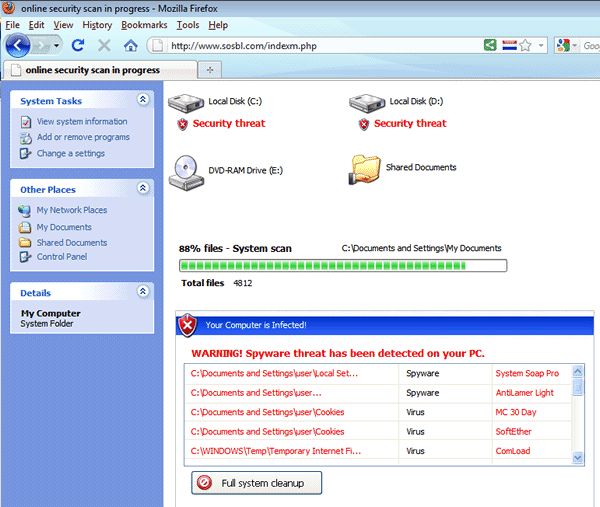
IMPORTANT: You'll know it's not your computer because it's actually in your web browser. Notice you can see the address bar with the URL filled in.
What happens if I stay on the infected webpage?
In the image above you can see a scrolling green progress bar (says 88%). After it gets to done (100%), the screen changes to:
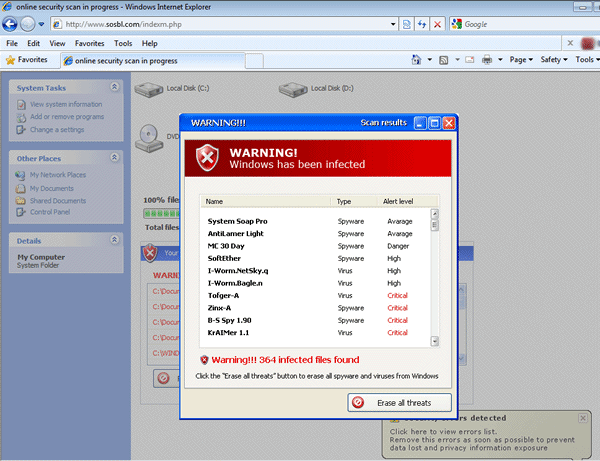
Now it tries to trick you into clicking the “Erase all threats” button to infect your computer.
DO NOT CLICK THE ERASE ALL THREATS BUTTON. CLOSE THE BROWSER.
If I close the browser did my computer still get infected?
Even though you did not click on any buttons and just closed the web page, your computer still has traces in your browser history, web cache and cookies, and it may have downloaded other files.
Anytime you ever experience a page like this it's always best to delete your cookies and cache and do a complete anti-virus and malware scan on your computer immediately.
Does Skype know about this fake virus scam?
In an effort to combat this issue and provide protection for you, I've contacted Skype's Customer Service department. Customer Service has responding with the following:
We understand your concerns regarding receiving spam calls claiming to be from Skype.
If you receive an email or a call claiming to be from Skype under the name of “Online Notification” or “Skype alert system” or from the Skype usernames “drzabcalert11” and “drzabcaert4”, do not answer it because it is a spam call that will tell you that you have a virus on your computer and will ask you to visit www.sosbl.com.
Fraudulent emails and calls may ask you to provide your Skype password, Skype payment details, or other sensitive personal information. They may also advise you that your account is being cancelled, you have been reported for abuse, or that your payment or password has been refused or changed. If you receive an email or a call like this, please let us know immediately.
These emails and calls are known as “spoof” or “phishing” emails or calls . The people who send them hope that you will:
Open the attachment to the email (if provided) or answer the call. If you do so, the attachment file or the call itself could infect you computer with dangerous viruses.
For more information on Skype security, please visit: http://www.skype.com/go/security/.
Skype Customer Service
Is the malicious website still on the internet?
As of March 17, 2011 at 11:50 am CST, the answer is YES! The abuse has already been reported in an attempt to take this malicious website down. But in the meantime, please do not visit the link and hang up if you receive any of these calls.
Be sure to protect your computer with up-to-date anti-virus software and run daily scans. And protect your WordPress sites by not keeping your login information or other important credentials saved on your PC.
UPDATE: March 18, 2011 at 10:15am (CST)
Woohoo! The website has now been taken down by the hosting company. Thankfully, anyone being tricked to open the URL are safe at the moment. It is possible for the scammers to move the site to another host, so we'll see if it stays offline.
You can check to see if the site is offline by visiting:
http://www.phishtank.com/phish_detail.php?phish_id=1156033
UPDATE: March 22, 2011 at 9:15am (CST)
The domain of udateba.com is a new domain that was reported to us as where the scammers are directing their callers to go to. I have checked that domain and so far it has not been registered.
UPDATE: March 24, 2011 at 6:48am (CST)
One person has commented on this post that when attempting to send a Skype message to the caller it crashed her laptop and she is unable to turn it on/boot.
UPDATE: March 24, 2011 at 4:15 pm (CST)
The domain updatega.com has been reported as the url that some scammers are telling their callers to go to. This site has already tricked someone that left a comment on this site to purchase their “virus fix” bogus software.
UPDATE: March 29, 2011 at 9:45am (CST)
updatega.com is still live but has a 403 Forbidden error so thankfully, at this moment, no one can be “tricked.” Methods have been put in place to seek and destroy!
We need your help
Have you received a scam call on Skype? If so, please look at your Recent History and find out the Skype Name, date and time they called you so we can continue to report it to Skype.
Were you referred to a different url other than sosbl.com? If so, please let us know so we can continue to help each other stay safe. Leave a comment below.
I will update this webpage of any new developments.
Securely yours,
Regina Smola
WordPress Security Expert
Follow on Twitter @WPSecurityLock
Become a Facebook Fan
| drfacima8a |
| drfam9aa |
| drfcammmaikaa5 |
| drfiakalvinn1 |
| drfiakalvinn5 |
| drfikaloapal |
| drhelpmnsys10 |
| drkidavusggkam10 |
| drsybasysm11 |
| drupdateinfozbc3 |
| drupdateinfozbc8 |
| drvmupdfazuu2 |
| drz1sysnotice4 |
| drzabcalert14 |
| drzabcalert2 |
| drzzjohnsimmalm1 |
| sintsystmas11 |
Just got a new update from Skype and I updated the post above – “How do I block or report a contact to Skype.”
Regina –
Thanks for your vigilance and you action!
I got the Skype call, as you know, but recognized it as a scam immediately. My wife got the website – exact one you show above – without the Skype call so they must be active in other ways too.
The question you answered about “If I close the browser did my computer still get infected?” and your solution is the one everyone needs to know. I’m deleting cache and temp files on all my computers now.
Thanks again.
dp
David,
Thanks for your comment. You helped with my investigation and reporting this issue to Skype and I appreciate your input.
I’m glad you saw my answer about cleaning your cache and cookies. I did update this post and made it bold and red to stand out hoping that others see it as well. It’s a very important step in protecting your computer.
~ Regina
Thanks for the info and I just wish all these people found something better to do with their time and leave the people that are trying to make a little money alone and I’m being nice I know what I would like to do to them lololol
Nancy
Skype: nancyradlinger
Hi Nancy,
You’re welcome. I agree. You would think they could find something productive and worthy to do. I’d personally like to put them over my knee and spank the skin off their hide! Then, I’d like them to spend about 10 years in a cell with “Big Boy Bubba.”
I added you to my Skype as well if you ever need anything 🙂
~ Regina
Ohhhhhhhhhhh I like your style and I agree with you totally and nice meeting you 🙂
Thankfully I have a proxy filter that scans for viruses as you visit web pages. The likes of this page never seem to affect me, and the same protection can be used to prevent some of these fakeAV’s from downloading more as it scans the files being downloaded and blocks them at the router/firewall.
Even though I have these precautions, I still will always recommend sensible firewall rules on the computers and an anti virus such as microsoft security essentials (note not “internet security essentials”), which is free and incoporates beautifully within the windows environment, particularly with 64 bit systems.
The best form of protection against these threats on any network is still user training, as there are so many variants out there, and so many new variants continue to be released that most of the virus checkers fail to keep up to date (no fault of their own, just the signatures can be out of date so quickly).
I’ve posted a couple of similarly related articles on my own blog, about the experiences I found on a few of the laptops that have been brought to me.
Thanks for your comment and suggestions, Jamie. I’m glad you’re taking precautions.
Many of these malicious websites are infected with zero-day viruses/malware and haven’t been detected by anti-virus programs yet, so even arming your computer with the best defenses can still get through.
You wouldn’t believe how many people I talk to that get tricked into thinking it’s a real virus and get infected.
It is funny that you sent this out the day after I got a call.
The name was drzabcalert14 called on March 15th @ 10:59pm
Please continue reporting – I appreciate what your doing
Hi Angela,
It’s amazing how many people they are calling with this scam. Hopefully Skype finds a common denominator to get rid of them.
I’m adding the scammers skype name: drzabcalert14 to this post above. Thanks for the info. I’ll also pass this info along to Skype customer service.
Be sure that you block and report them too via your Skype.
Thanks again,
Regina Smola
The malicious website has now been taken offline by the hosting company. I’ve update the post above with this info.
I rec’d a skype call 3/18 @ 7:03….directing to go to sosbl.com…. from drfacima8a . I was not sure if it was sosbl or sosdl. I’m glad I checked this out. I have never experienced this type of happening before. Don’t care to either!
Hi Cindy,
Thanks for reporting this to us. It seems that every scammers skype name starts with dr. I’ll add the name you gave to the list above.
Scammers try to get more and more creative all the time. I still can’t believe they are calling people. That seems more risky for them to get caught than Online stuff. I hope they nail them!
Thanks,
~ Regina
P.S. I updated your comment to remove the link so it’s not clickable (www.).
I just received the call at 2:10am. the screenname was drfam9aa and used the fullname of System Service. I knew it was a scam and search online for verification after hanging up to find your post. Thank you for the information.
Hi Veronica,
Thanks for reporting this information. I’ll update this post with the scammer’s skype name.
Glad you knew to it was a scam. I’m just wondering how many people actually thought it was for real and clicked the link. Hopefully no one.
~ Regina
Another Skype name to add:
drfikaloapal
call comes up with a full name of Service Report
Hi David,
Thanks for comment and reporting the caller’s name. I’m adding it to the post above. Hopefully they’ll catch them soon.
~ Regina
I received both a call and message on skype this morning minutes apart. The call was from “Service Update Information” asking me to go to sosbl.com. The message was from sintsystmas11 and gave the same info, but asked me to go to udateba.com for the update.
Hi Cassandra,
Thanks for the info. I’ll update this post.
Looks like they’re trying to use another url to direct people too. I checked that domain and udateba.com is not registered to anyone. So at least no one is going there and getting infected.
Also looks like their changing up their Skype names since the other one was from sintsystmas11 and didn’t start with dr.
I’m updating this post. Thanks again.
~ Regina
Just happened to me –
The name was drfiakalvinn1 and I received the call at 8:45pm tonight, March 21. Luckily I didn’t fall for it!
Hi Erin,
Thanks for reporting this. I have updated the post with your new information. I’m glad you didn’t fall for it either 🙂
~ Regina Smola
Looks like these scammers are still at it. I received a call from “Update Notification” today at 10:43 GMT. Answered, but I quickly hung up. The skype name is drfcammmaikaa5.
Hi MJ,
They just never seem to stop. You’d think they would since Skype is aware of what they’re doing. I’ve updated the post with your info.
Thanks for letting us know.
~ Regina Smola
I recieved a call last night at 4 in the morning from drfiakalvinn5..also called ONLINE REPORT NOTICE…I was half asleep, and answered the call. It said something about a virus being on my computer. Of course I knew it was bogus, I have a brand new computer, just out of the box for 2 days. Also today during the day, there was a call from a drvmupdfazuu2..also called Service Update Report.
Just letting you know that they are under different names. Its ridiculous how people will find every avenue possible to get to you.
Hey Kim,
Glad you were awake enough to realize it was bogus. It’s amazing they called you twice.
Thanks for turning this into us. I appreciate it.
~ Regina Smola
I just got the call last night, March 21st, I hope this doesn’t mean that have found another host.
Hi Lisa,
I hope they haven’t found a new host either. Do you remember the name of the url they told you to go to?
~ Regina
Just got that call from my skype via my iPhone stating I had a virus and to go to sosld.com
I decided to look further into this because I had concerns it was a hoax.
I was right!
Hey Denise,
Thanks for your comment. Do you know if they said sosld.com or sosbl.com?
Glad you didn’t fall for it 🙂
~ Regina
Just recieved a call from the username drz1sysnotice4 telling me to go to soslb.com
March 22, 2011
5:45pm
This article was very helpful in understanding what the call actually was!
Thanks for letting us know Ashley. I’m updating this post with the username.
Just got one today March 22 7:30pm central.
It was not for sosid.com but some other website. Said the same things tho. Automated and repeating the website. I was too busy trying to hang up to get the website.
3 Times this month so far.
Also I would like to stop all people from contacting me saying they were looking through the list of people on Skype and seem interesting, as this is also Spam.
My Settings are set to Private and I want to set my name as Private but Skype won’t allow me to do so. I want my Entire Profile set to Private!
I DO NOT want random people contacting me as so far they seem to all be Middle Eastern Names trying to do so. Please let us put our Entire Profile on Private/Contacts only.
Hi Judasx3,
Thanks for your comment. They are pounding the Skype pavement with calls and messages.
The best you can do is go to Tools > Options > Privacy Settings and change Allow calls from…, Automatically receive video and screen sharing from…, And Allow IMs from… to “people in my Contact list only.”
One other area to check is on Privacy Settings, click on “Show basic options” and make sure it’s set to “Only allow people in my Contact list to contact me.”
This will ensure that you have to receive a Notification to accept a contact before they can send you messages.
Hey, I just got one of these under a different name – drupdateinfozbc3
They are so pathetic!
Hi Sarah,
I’m adding that username to this post. Thanks for the info.
Yes, I agree they are pathetic. Their mamma’s must be proud.
I got called by this today, but declined to answer the call because it was an obvious scam. (Skype won’t give updates by calling you.) I then Googled and found this page.
Just to let you know, the Skype account name calling me was “drupdateinfozbc8”.
Glad you didn’t accept. Thanks for the Skype username. I’m adding it to my list above.
I too received a phishing skype call today. Approx. 1PM CST
Skype displayed the full name as John Simmons @ Online Alert
Skype username of drzzjohnsimmalm1
When I did a search for this skype name there were 6 variations of that same name in the skype directory.
Be alert folks!! =)
Hi Matt!
Thanks for the detailed info. I’m updating my post with this information.
Thanks again for doing your part in helping us all out.
I got the call last night. I answered it and listened to the message several times because I wanted to remember exactly what the websie was. I was in the middle of filling out a job application! I DID NOT go to the website, but I sent a message to the person who was on Skype “Where are you calling from?” My brand new laptop crashed and I cannot get it to turn back on. SOMEONE PLEASE HELP!!!
Hi Jennifer,
Thanks for your comment. Wow! That’s not good. I hope you got your laptop fixed. If you didn’t try to do a system restore back to it’s original factory settings.
Makes me really leary now about this whole thing. If you sent them a message and it killed your computer that’s far worse than trying to get us to click a link. I’m contacting Skype right now about your issue.
I got the call a lil bit ago. Skype name was drkidavusggkam10
Thanks for reporting this AnnMarie. I truly appreciate it. I’ve added the name to the post above.
My wife was caught out with this today, not from a call but from a Skype message. The name was sintsystmas11 and she was advised to go to the website updatega.com to buy the corrective software. Unfortunately she did not realise this was a scam, went to the website and gave all her details including credit card info! I googled the name and got this site. She will cancel her credit card ASAP but any further advice would be much appreciated. She has a Macbook Pro and I have no idea about virus software for Macs. Any advice about that?
Thanks,
Greig.
Hi Greig,
Wow!!! I’m in shock. Hopefully you got in touch with the credit card company and reversed the payment and had them cancel the card too. That’s some pretty scary stuff.
You might want to consider getting some identity theft protection too, like LifeLock, since they have her pertinent details.
Let your wife know that Macs rarely if ever get viruses when you keep them updated, and anytime she gets an alert like this it most likely is a scam. You might want to check out the following links:
http://www.apple.com/support/security/
http://www.apple.com/macosx/security/
http://support.apple.com/kb/HT1222
Hope that helps.
Please keep us informed of any new developments from this episode.
Thanks for your comment,
Regina Smola
Hi Regina,
Thanks very much for your help.
Greig
🙂
Received 2 calls today from sintsystmas11. Directed to URL updatega.com
Thanks for your report Anonymous. The name and url has been added to the post above.
Thanks for this security update. I have not been on Skype for a while so this alert would keep me ‘alert’ and on the lookout for the skype threat.
Hi Stella,
Thanks for stopping by and leaving your comment. Glad you know ahead of time in case you get one.
Be sure to update your privacy settings on Skype 🙂
thank you for this information, it saved me sometime and a possible headache.
I received a Skype call from John White @ System Alert tonight April 1 at 7:24 AEDST (Aus). I only use Skype on my iPhone. The username was drzzjohnwhiteg10.
PS. Thanks for this blog! I have several friends who use skype and I’ll be forwarding your site on to all of them 🙂
Received a call today from John White@service alert. I was expecting a call from my son so just clicked ‘answer’ without looking. When I heard a message about a virus scan I hung up immediately. We have a Mac and I know the don’t often get viruses. Didn’t wait to hear about a website.
Just got a call, reeking of scam. Skype name was drfikazivacc8. Hope this prevents someone more gullible from falling into a trap.
I JUST GOT A CALL FROM DRFAVBBIKFAS2 SAYING IV GOT A VIRUS MUST BE A SCAM
I got a call like this this morning from ‘System Report (drfavbbikfas2)’. The message began as has been listed here but when it got to listing off the ‘affected’ windows systems luckily my connection cut off. I have since reported the caller to skype and blocked them.
Just missed a call from System Report. Skype name drfavbbikfas1.
Didn’t new whether to call back or not, but the Skype name seemed unreliable, so i googled. Now I am glad i didn’t make that mistake:)
Hi i recieved a call from System Report today, I did answer but it sounded like a broken robotic voice and as soon as it said virus i hung up and blocked/reported this person the name was drfikazivacc8, I have run virus programs on my pc AVG and found nothing but this has me quite shaken and concerned as im not truely amazing with computer’s can this call have placed a maliscious file somewhere on my computer with the 5 second period i was listening to it?
Many Thank’s and Hopefully these people will be stopped.
I just got a call from System Report. I didn’t answer it, but searched for system report in the directory. Usernames I found were
systemreport
drfavbbikfas10
drfavbbikfas6
drfavbbikfas7
drfavbbikfas8
drfavbbikfas9
drzafcviians1
drzafcviians2
drzafcviians3
drzafcviians4
drzafcviians5
drzafcviians6
drzafcviians7
drzafcviians8
drzafcviians9
thai.report.249
Don’t know how many are scammers or what links they want you to go to, but just don’t call any of them or accept a call from them.
Hope this helps other people. The stories people have put in these comments sound horrible.
Hi,
Thanks for all your really helpful information.
I received a Skype call from ‘System Report’ at 13:15 today (2nd April) with a computer-generated voice telling me my Windows files were infected with a virus. It gave me a website to go to. Angry that something had managed to get hold of my contact, I went to see the website, and my Mac identified it as malicious.
I’ve just started using Skype, and have now set my calls to only contacts – thanked for this!
I’ve deleted my history and cookies – will my commuter still be infected?
Thanks,
Fi
Ps that’s 13:15 UK time…
I just got a call now tellng me to go to sosbl.com. I didn’t and immediately googled it and ended up here. Thanks!
Oh and their Skype username is drfavbbikfas6 and their location is showing up as the United States
You indicate that they may be able to infect us if we answer a call. I hung up as soon as I realized it was spam, and my protection software has not noticed anything, but is there a way I can check to see if I got something from the call? I’m running Mac OS X.
BTW, the name was drfagikambinn9
I just got a call not to long ago. Like at around 10:05?
It was a call from Alert Monitor Notice. I didn’t answer the call though cause I didn’t trust it because of its skype name drfagizkauijs1 .
It seemed to suspicious so i just left it to ring until it hung up. Then I looked for it around google and came across this site and realized drfagizkauijs1 looks very similar to the list of names you got here. So I’m pretty sure this guy is also doing a scam.
Also I’m a bit worried cause I commented on the caller after he called. Only until after i blocked and let calls only come through my contacts did I see your update on the person who’s computer crashed after they commented. But nothing has happened to my laptop. So i think I’m fine.. i hope.
thank you so much for posting this article! i was on my laptop and i got a call from Alert Monitor Notice and i ignored it fearing it would be a scam. and i was right! the username was: drfagizkauijs5
thanks again!
-sarah
Just got a call from them the username is drfagizkauejs8 full name is Alert Monitor Notice and region United States.
Got a second call from fagizkauejs9
I had a call this morning at 10:25am from ‘Online Monitor Alert’ – which apparently is based in the United States. I have blocked this contact, and I’m assuming it’s part of the above scam you mentioned on this page.
Thanks!
I’m now having someone attempt to contact me called ‘handsomecabuboy’
I have a missed call on skype from Online Monitor Alert (drfamonitar10) at 10:26am 4th April 2011UK. It says they are from the US.
Just got a call from Alert monitor notice, username drfazalertuyy3. I’m in Norway.
Says its based in the US
Thanks for the article : )
I have just received a call from “Alert Monitor Service” (drfazalertuyy6) , fortunately I didn’t get it. Thanks for the information on how to set one’s privacy.
Hi,
I just received a skype call from “Alert Monitor Notice”, the user name was drfazalertuyy9.
I rejected the call and blocked and reported the user.
Thanks,
Kreena
got a call from drfazalertuyy10 with username alert monitor notice. i answered it but hung up straight away and blocked it… really hoping i havent got a virus now…..
just received call with the id “SERVICE REPORT ALERT ” with id starting at drfagizkauijs5….and region was USA.
Just got a call from “Service Report Alert”, username drfaczalsmm5 directing me to go to sosbl.com. Don’t know if sosbl.com is still active (didn’t attempt to visit it!) but someone is still peddling it.
I got a call today from drmasonxvsw3
I just received a call from Online NotificationⓇ (drvnajkadir8).
I didn’t answer the call. I blocked and reported this user.
I just received a call today from ‘System Update Alert’ under the Skype name drfdgifjgij1 claiming windows had a virus. The reason I knew it was fake was that it claimed I had all versions of Windows and they were all affected, which isn’t true. I also have a reliable antivirus so there’s no reason why Skype would catch something and my anti-virus wouldn’t.
The website I was instructed to go to was a bit different…
http://www.sosgt.com was the website and I noticed others were given sosgl.com, so maybe they’re trying to use another site?
I just got a call from one of these alert systems, with a machine telling me to visit sosgt.com. I have blocked them and checked the report abuse box.
Thanks for the info, I now know not to answer any of these calls, this is the third one so far…
I received a call on skype referring me to the site sosbl.com from Online Service Report. The user name was drhikalamaz9. I got the call at 8 p.m. Tonight 4/12/11. Please report this to Skype! Thanks!
I just received a spam call from Online Service Alert (drfgcamaikaz1). Also based in the U.S.
I received a call at 11:50ish am (GMT) today (13th April 2011) from “Online Service Report” (drvianjajjz1). Answered the call (not realising the whole spam business) but it had connection problems within a few seconds and couldn’t be reconnected (thankfully).
I have since blocked the user and changed my call settings (didn’t even realise that there were options for that to begin with!!)
I got a call about 4mins ago from ‘online service report (drfavikalmz2) asking me to visit sosl.com
I received a call from drfavurgntz7 on Friday april 8th at 9:37 pm… I already reported it as spam
I just got this call last night and immediatly shut off my computer =(
dralerthelpzc10 AKA “Help Alert” just called me and directed me to sosbl.com. I feel like the last one to be invited to a party I didn’t want to go to in the first place, lol
Just got a call from name “Help Alert” username “dralerthelpzc10” Reported as well.
I just got the call from Help Alert user name dralerthelpzc1. I answered on my phone instead of my computer. I reported/blocked them as well.
I just got a call from drupzviajd3 directing me to a website – I didn’t take down the domain name – and have reported it.
I just got a call from drupzviajd3 and have reported it
i don’t know if this is a scammer address, but the skype name sure looks a lot like those listed above. it came as a help notification (or something like that), from skype user name: drsvhelpzza10
thanks for spreading the word about how important it is to be cautious out there…
I just got a call from dridlgidgj heading Computer Service Alert Ⓡ, at 9:35 am PST, 27 April 2011,
blocked him from contact list and reported as abuse.
I received the call this morning (April 27th, 2011) at 10:27am ET. It came from System Alert (draitmamsvim). (In between “system alert” and “draitmamsvim” is a registered trademark symbol.) The call was dropped for some reason, so I did not get the full message, but I have reported the user and blocked them from calling me again.
Same – just got the call at 8:30 PM – of course I didn’t go to the site – I have only 3 people on my list and only talk regularly to one, so I knew better. But I did block the caller – sorry, didn’t take down the ID. It just said “Online System Repair.” I know virtually nothing about Skype, so I don’t know how to go to the history to get the ID. 🙁 If someone can tell me how to do that, I will, though I’m not sure it matters. I also reported it.
I got a call at 10:43 PM on 28 April 2011 from dria3mijdf that read “Computer Service Alert.” I blocked and reported as spam.
Got my call tonight. Hung up because it sounded fake to start with. I’ve had too much experience undoing damage that stuff like this causes.
Got a call from “Computer Repair Service” at about 8:45pm EDT April, 28 2011. I thought the call was from my wife, who is currently working on a project in Europe and is the only contact I have in my Skype account. So, I didn’t look to see who the call was from. An automated voice started telling me that my computer was infect and that I needed to go to some website for some kind of a Microsoft update repair.
I knew this was scam to get you to download one of those fake alert Trojans. I closed Skype, updated and ran Malwarebytes and then changed my settings in Skype to block any calls not on my contact list and reported the call as spam and abuse.
drkadikami tried to call
8:40PM California time May 20 2011.
There *IS* a person on the other end listening. I made a blank threat to hack their system and own it and the call immediately disconnected.
Feel free to answer and go “We’re on to you now!”
About twenty minutes ago (8:20 pm) I received a call from *NOTIFICATION* (drmikaifjgfma) while I was afk. When I got back it was telling me my computer required immediate attention and referred me to dodhh.com. I googled it to find out information on the website, but there was none whatsoever, so it must be their new site. (May 20th, 2011)
Just got a call today from drdavudsonciman A.K.A. “*N O T I F I C A T I O N*”
This is the first I had heard of this kind of phishing scam using skype, and the odd thing is (double checked this, trust me) I have my settings so that I cannot receive calls from people that are not in my contact list.
I’m curious how they circumvented this setting.
Luckily, I was signed into skype on my ipod touch, so it didn’t affect my PC in any way, and I don’t plan to be visiting any websites.
May 21, About 5:20 PM CDT. Hey, could it be a sign of the rapture?
I just got a call from *NOTIFICATION* on Skype, I think it was telling me to go to www . goghh or something like that.
I didn’t go there – I just hung up
I got a call from “* N O T I F I C A T I O N *”
I ignored him because it looked suspicious.
The user name he used was “draxsmithamsijfd”
Got the call today that said *NOTIFICATION* from draazdavidsontim around 4:36pm and thankfully, i was talking to someone else, so I declined. After reading this I blocked them and reported it as spam.
Got a Skype call today that said Notification. Quite startled by it and declined the call. Will check to see where it came from in history log.
received a call at 1:18 am from Online Help Skype name dramizhelpman. told me to go the website mentioned above, if i didn’t it would result is serious computer malfunction. i reported and blocked the user.
“Online Help” (drfmifidmfidmifdmmcv) called and instructed to visit something like “golhl.com”
I received a Skype call today from the name Online Help user ID drtimahelpmx, with a recorded message stating I needed to go to www. golsg[DOT]com to download a “required update”. I blocked them and reported as spam.
Thankfully I did not visit this site but instead I researched this and came across your information.
Received a call from drtb11onlinenotification at 2:25 today. Answered it. i listened to the message but didnt catch all of the url I was instructed to go to, but it was something close to sosbl.com site.
Got a call today from “NOTIFICATION” drfi1onlinenotification. Denied the call, reported as spam.
Got a call today from ‘Notification’ asking to goto www. sorog[DOT]com. Skype Id was drazklfdonlinenotification
Recieved one from NOTIFCATION a few minutes ago, username is drarimac. Wasn’t sure what the heck it was, so I answered. I forgot the website they told me to go to though.
Received unsolicited recorded skype call from man claiming I had computer issues and told me to go to a web site called “www.gowoh[DOT] com” .
I terminated the call and did not visit the site. I have blocked the caller and reported this as abuse. I have also adjusted my settings to allow only callers on my contact list to call me.
Just had 2 calls from “NOTIFICATION” telling me to visit www .gorsl [DOT]com – if you go there you will get a status bar at the bottom of the page, with a list of known trojans and viruses on the screen, as if it was trying to help you in some way. I shut the page down before it did anything. (hopefully the fact that I’m on a mac will not allow it to do anything….
From what I can sEe from my iphone (it does not show the full name because I don’t think the screen is big enough) the username was “d.activate…w.gorsl[DOT]com” Hope that helps 🙂
Got a call from NOTIFICATION at o.activate.at.www.gorsl[DOT]com ended the call, blocked and reported it as spam.
Got a call from System Protection (skype caller id gha.system.protection that used an automated voice and asked me to visit helpsg[dot]com. The site is exactly the same as the one you have a screen shot of.
Received a supposed scam call at 10h30 on 21/06/11
Terminated the call, reported & blocked.
Caller ID was SYSTEM PROTECTION
Skype ID: ada.system.protection.d
I just got one on 28 July, 2011
Caller ID was NOTIFCATION
skype ID: adb.notification.aa
I hung up before I got to the web site. Have changed my preferences in mac on:
skype > Preferences > Privacy > Allow Calls from: Contacts
Hi Becci,
It’s amazing that they’re still trying this scam. Glad you got your settings updated 🙂
Got a call from NOTIFICATION (skype name: ba2.usa.notification) an hour ago and told me to go to sowlo.com. Reported it as spam and blocked.
USA.g1.notification called me on august 9th, 2011 I did not answer. This number called at 10:14am.
I got a call a few moments ago on skype. The call came up as NOTIFICATION caller. I answered and it was a robotic voice telling me that my computer security software was out of date and that I needed to go to http://www.soswh.com to update the software and get rid of any viruses that I have.
The actual ID of the caller was: NOTIFICATION (usa.iq5.notification)
Just recieved a “notification” call at 9:20pm the user name is usa.oca1.notification it directed me to the sosbl.com but I hung up the call and never went to the sight. The user is blocked and reported as spam.
This morning when I was half asleep I heard a super werid sound coming from my iPhone. Half asleep I noticed it was a skype call so I answered it since only family is on my
Friends list right now. When I answered the call at 10:15am it was titled as a “notification” and said all of the info like what you just described on this site!! The user name is ….. Notification.usa.mb07! Hope this helps figureout this annoying issue!!! Also, did I recieve any virus through my iPhone or even MacBook because of answering this call??
A few days ago I got a call from NOTIFICATION which freaked me out and I blocked them but since I didn’t listen to them, I didn’t report abuse (wish I did). The screen name is “a3.usa.notification”
I’ve gotten this call just a little while ago. Any computer literate person would know that this is highly likely to be some sort of scam, but for those that don’t know, I’m pretty sure that if Skype employees were to notify the public of anything urgent, they would put it on their website and/or put something in the Skype client that would let you know. If for some reason they had to call someone, It most likely won’t be from a username similar to those above, and they will most likely have an image or badge for verification that they are a Skype employee.
yeah there was another one from an obvious spam username… looking it up I then found this. Name was something like ‘urgent notification – requires action’ or some utter crap. *rolls eyes*
ONLINE ALERT(R) – ACTION REQUIRED
August 18 4:00pm
Did not answer
Blocked and Reported as abuse
Just recieved a skype call from “a01.computer.system.notification” Tuesday August 16 11:35am Hawaii Time
I recieved a call a couple minutes ago from a user called ‘ONLINE ALERT® – PROTECTION REQUIRED’. I declined the call, out of fear that it was a scam like the ones that were mentioned before. About a minute later the user called again and I declined. I think that this user is a scammer (I’m not completely sure) but I think you should add it to the list of scammers.
Just got a call with this screen name (and this username): ONLINE ALERT® – PROTECTION REQUIRED (u01.computer.system.notification)
Did a quick search on the internet and found this website. Thanks!
Received two SKYPE calls today on i-phone from “ONLINE ALERT” advising me that my computer was not secure and to go to SOSWOS[dot]com. I have since blocked this caller.
It is still happening. Skype call received today from “Online Notification.”
Just got a call like this, with a different website to visit… unfortunately I didn’t write that down. Just a heads up, they are still at it.
Skype call was from: Online Alert (with a registered button after it)
Skype Name: dr3.computer.system.notification
No, I did not answer the call and YES! I immediately blocked the user.
I just got two calls, at 3:23 and 3:30 p.m. (CDT) from ONLINE ALERT (followed by the “registered trademark” sign). I didn’t answer them, because they seemed fishy. Yours was the first site that came up when I googled “skype online alert.” Thanks for reporting on this.
Oh my gosh, thank you so much for this post.
I never knew that you could get incoming calls and messages from people that weren’t my contacts.
I immediately fixed this. I knew something was suspicious the moment that happened. I almost called back but was afraid to, so good thing I didn’t. Thank you so much for this article!
But the problem is I blocked them TWICE….and reported abuse only once. It was a big long name.
http://i.imgur.com/ONg0A.png
I should’ve took a picture of it’s screen name, but I reported abuse.
I just got the call, and as soon as it gave out my computer ID I disconnected and signed out of Skype. Then searched to see if this was a virus and got your very helpful site. I have since (as of writing this message) received one more call from them. I have blocked and reported the user. Thanks for the great info.
A new account tried to call me. The screenname was “Online Alert ®”, and it was called “c1.computer.sys.notification”. Hopefully anybody who gets called will know about this, I’m forwarding this to my friends.
i got a call on august 20, 2011(today) from this scammer called PROTECTION ALERT(z2.computer.system.update) at 10:44am. the call lasted 1 minute and 55 seconds, then it hanged itself up. the website it told me to go to was soslos[dpt]com, so i went, but right there i realized it was a scam, so i just closed the browser.
I got the call yesterday from Online Alert. I’m not famous nor do I want to be, so I knew it wasn’t hollywood calling me, haha.
Just now I had someone attempt to add me. The name said system alert mac protection. I am on a PC, why would I need mac protection? The name sounded strange to me and I typed it in google and I came upon this site.
The name was draimzsimsifdjidfjgf.
Today I got a call titled SYSTEM ALERT (R) – ACTIVATE MAC PROTECTION from (af2.activate.mac.protection[dot]us). I didn’t answer it as this immediately looked like a scam, (what legitimate company would put their message in all caps anyway?). Since I didn’t answer, I cannot 100% pin it as a scam, nor can I say it’s the same scam this site mentions, but heads up to anyone else who gets a call from this user. Thank goodness for this site. I notified everyone in my company to watch out.
I received 2 supposed messages from Skype this morning alerting me to the fact that my computer protection was “deactivated”. It turned out to be a pre-recorded message recommending that I fix this problem by going to this website: http://www.sosmss.com The call was placed by SYSTEM ALERT; Skype name of xb2notification.system.u01–a new one to add to your growing list! I have blocked this person & have checked off the “report abuse” box.
I just got a call from ad4.activate.mac.protection[dot] trying to get me to go to a website: sossl[dot]com or something to that effect.
I just received a skype phone call with a recording fitting this description. It referred to a url starting with sos, but I ended the call before the recording finished. the skype name they used was aa4.urgent.st.system.notice.a0
[3:27:55 PM] *** Call from ONLINE ALERT ® – URGENT NOTIFICATION, duration 00:48. ***
I have changed my settings to only accept calls from people in my contact list.
i got a call on my phone while i was using skype telling me that my computer was infected and that i should visit this website sofss[dot]com to update my computer protection software. thankfully i researched about it and found your website on the internet. i have blocked that contact now on my phone as well. thanks guys for the posts.
I just received one of these calls via Skype for iPad – as I was expecting a call from family, I just hit enter without really checking screen ID, but hung up when I heard the message refer to going to a URL containing SOS, instead of something Skype, which is what I assumed it would be.
I deleted the call from my history, but the name that appeared was “SYSTEM ALERT®” . Still haven’t figured out some of the advance stuff in this version of Skype, so no idea how to report abuse.
If ” the call itself could infect your computer with dangerous viruses”, what are the risks to my iPad?
Just had the same call from SYSTEM ALERT. When i picked up, there was a voice recording stating my computer number then I hung up and reported abuse and blocked the person.
These types of attacks farm the internet for Skype phone numbers. They do not differentiate between PC, Mac, or Mobile devices. As far as I am aware these cannot effect any Mac product (including the iPad). The iPad and iPhone are very very difficult to run anything that has not already been approved by Apple and fortunately hackers aren’t yet smart enough to know how to do it. Although if your device is “Jailbroken” that does allow for some higher security risks.
Hope that answers your questions!
Hi Kyle,
Thanks so much for your comment! And welcome to my blog. We have many mac users that visit the site and value any input you can provide us.
For those of you reading this comment. Kyle owns a Apple repair store and knows the ins and outs of mac security. If you’re interested in getting remote help, please send in a support ticket and I’ll forward it to Kyle to see if he can help you.
~ Regina Smola
FYI –
Just got a call from Skype Alert System
– I listened to the automatic message that directed me to go to
soshos[dot]com
– i hung up – did not go to the site
– moments later, I got a second call and declined it.
I received two calls yesterday from them back to back.
[8/25/2011 1:44:24 PM] *** ONLINE ALERT® – URGENT SYSTEM NOTIFICATION. ***
[8/25/2011 1:55:12 PM] *** ONLINE ALERT® – URGENT SYSTEM NOTIFICATION. ***
The user name they are using is ac5.urgent.system.notice.voice
I didn’t answer the call.
[11:31:34 AM] *** Call from ONLINE ALERT® – SYSTEM NOTIFICATION, duration 01:26. ***
answered it, it was a recording that said my virus protection was not updated and I needed to go to www[dot]soshss[dot]com
hung up, searched for info regarding scam calls, and changed privacy settings.
We received a call a few days ago, allegedly from “Online Alert – Urgent Notification”. As soon as I answered it, I realized it was a scam, hung up, blocked, and reported as scam. I then read about chat message scams of the same sort directing people to a website. I didn’t listen to the call long enough to be referred to a website, was only connected about 2-3 seconds. However, today our ISP shut us off, allegedly because of “viruses being sent out from our infected computer”. I have not been able to speak directly to them to get the details, and we’re running scans on the computer that got the call. From my reading, it seemed we should be OK, since we did not visit any website the call directed us to. I have not been able to find any info indicating the scammers can infect computers just by completing a call connection. Does anyone have any more information about this?
Thanks.
>> I have not been able to find any info indicating the scammers can infect computers just by completing a call connection. Does anyone have any more information about this?
Michael,
This comment from Skype customer service seems to imply that the act of answering the call can transfer a virus to your computer. They didn’t specify, but, I am assuming that they mean answering from an x86 based Windows PC.
“These emails and calls are known as “spoof” or “phishing” emails or calls .
The people who send them hope that you will:
Open the attachment to the email (if provided) or answer the call. If you do so,
the attachment file or the call itself could infect you computer with
dangerous viruses.”
I received the call from ALERT @ ONLINE NOTIFICATION via my iPhone, but, assuming any virus is an x86-based program
Thank you for the response. In our case the call was answered, briefly, on a Windows PC. After that it was blocked and reported. However, we did later have the local ISP temporarily shut down our connection because of “virus-like” outbound traffic.
We’ve performed two full virus scans on both computers on our home network. No threats found. Also monitoring inbound and outbound traffic with Little Snitch on Mac , and TCPView on PC. Haven’t seen any unauthorized activity. But if the malware has infected, say, the Skype application, and is rebroadcasting that way, we don’t have a way to distinguish this from normal Skype app behavior.
Does anyone have any more specific info, filenames, or anything else about the virus or malware being spread by the websites and/or calls?
Received a call tonight from ONLINE ALERT-SYSTEM NOTIFICATION. It said my computer was infected and to go to sobss.com
I received one of those phony calls as well on my SkypeIn account.
First of all it was self-evident this was fake as it announced itself as a System Alert and told me to go to a website SOS(something).
The other clue was the telephone ringing sound did not stop. Most calls end after about 10 rings or so.
Yes, I blocked the caller and reported it as abuse.
Be careful out there…
Just got a call from ‘ONLINE ALERT-SYSTEM NOTIFICATIONS’ telling me that my computer was not protected and directing me to go to soskss[dot]com to have my anti-virus turned back on.
called by “[12:34:58 AM] *** ONLINE ALERT® – SYSTEM NOTIFICATION ***” twice, 10 mins apart today, 8/27. username: ef3.system.notice.voice
didn’t answer, blocked and reported.
Saturday, August 27, 2011
[8:06:23 PM] *** Call from ONLINE ALERT® – SYSTEM NOTIFICATION, duration 00:57. ***
[8:13:52 PM] *** Call from ONLINE ALERT® – SYSTEM NOTIFICATION, duration 01:56. ***
Both calls said the same thing:
This is an automated computer system alert. Your Computer protection service is not active. To activate computer protection and to protect your computer go to http://www.sosqss.com
I received 2 Skype calls at 1:55 and 2:05 am. I answered the first one in my groggy sleep state without really looking at my phone. It gave me the same website…all I caught was the sos part but I’m pretty sure it was the sosbl.com. I’ll be blocking the contact on Skype, hopefully there will be no residual effects on my iPhone!
I CANNOT believe they’re still trying this!! It’s mad. Since blocking the first one and changing all my settings, I’ve been fine – let’s hope they’re still this dimwitted for a long old time to come! At least we know what we’re dealing with!!
I have gotten calls from 2 different people that are spam.
ac5.urgent.system.notice.voice
ONLINE ALERT – SYSTEM NOTIFICATION
Just got Online alert -Skype Notification on my iphone 12 noon and didn’t answer. Goggled and came here, wow, is anything safe. I have to go on to SKYPE and change settings i imagine? Anything else we should do?
Great site thanks for the info!
I have received a call today from the ONLINE ALERT virus thing at 2:39pm. It is evident that the site has not been taken down, and is still up and running. Fortunately, I am pretty smart, and didn’t answer the phone call..
I too recieved two calls about 5 minutes apart from ‘usa.de5.osx.system.voice.alarm’ saying that my computer protection software wasn’t working and that I needed to go to sosros[dot]com to enable it and fix errors. I hope that my answering the call did not have any effects on my laptop. Skype needs to do something about this problem immediately.
I got a call about 10 minutes ago from ONLINE ALERT-SYSTEM NOTIFICATION. Because I was not expecting a call and did not recognize the name I immediately blocked the caller and decided to do a google search which brought me here. I am pretty computer savvy and was shocked to find out I had not changed the settings in skype. Thank you so much for the details. Hopefully whoever is behind this gets kicked off soon!
I just received too a call from ONLINE ALERT® – SYSTEM NOTIFICATION (db4.urgent.computer.notice.voice) today at 11pm. It told me to visit sos[dot]kos[dot]com. It seems that they started again around the 20th of august…
(well, 11pm montreal time, 10pm this web site time)
I just got the same call today at 9:22 Australian time, and i blocked the contact after reading this site. They told me to go to the sobl website
I have been receiving calls over the past few days from ONLINE ALERT® – SYSTEM NOTIFICATION with the skype names of ‘usa.df6.osx.system.voice.alarm’, and ‘tb3.computer.protection.warning’. I was not at my computer when any of the calls came through, so they showed up as missed calls. I have blocked and reported both users.
I’ve gotten multiple calls over a several week period. Each time I block and report, but I guess they just switch user names. Today I got two calls from qa1.computer.protection.warning before I blocked them.
I received TWO calls today. Both say ONLINE ALERT® – SYSTEM NOTIFICATION. Skype name is b4.alarm.computer.protection.off for both of them. I don’t know why I was so special to receive two calls within five minutes…
does listening to the voicemail hurt your computer at all? does anybody know?
I just got a voicemail overnight from “c2.alarm.computer.protection.off” and I listened to it – couldn’t hear any words, just a minute and a half of silence with a loud beep in the middle. The transcript made it sound like the problem described here, repeating this line: “attention. This is an automated Computer System Alert, your computer Protection Services not active. To activate computer protection and repair your computer. Go to www, dot, s, ohh S W. A. Hey Al, dot com”.
Hi there. My wife had her Skype account open and got a call from “ONLINE ALERT -SYSTEM NOTIFICATION” twice this morning. Username was y2.alarm.computer.protection.off. I recognized it as being probably a scam of some kind and declined the call both times. So, just letting you know that they’re still trying to get people.
Hello,
First of all, thanks to Regina for this security post. This is really helping a lot of users out there that are experiencing this criminal activity!
If anybody else is experiencing this activity, and has managed, accidentally or otherwise, to get the websites they want you to go to (BUT PLEASE DON’T GO TO THOSE SITES!), please post them here so that everyone else can be forewarned of those sites.
This will also be helpful for us in the security community so that we can block the sites accordingly.
Stay safe guys!
— Ivan
Hi Ivan,
Thanks for your comment. This post has become very popular with many reporting the rogue callers and sites, and I’m thankful everyone is coming together as a community to help spread awareness.
As you mentioned, the sites that are being reported are unsafe and should not be visited. The sites that the Skype scammers are giving out are rogue sites containing malicious content that can harm your computer and they’re trying to “trick” people into opening them.
Ivan, I appreciate all you do to help others stay safe at Trend Micro and glad you’re checking out this post to help combat these rogue sites. I would love a followup of any new information you find for our readers on this scam. And any tips you could offer as well. Feel free to send me any updates at http://wpsecuritylock.zendesk.com or at https://wpsecuritylock.com/reporter.
Securely yours,
Regina Smola
Hi Regina!
You’re welcome and thank you once again for this post!
These RogueAV or FakeAV criminals will stop at nothing but we as a community can help each other out by thwarting their nefarious efforts and nipping them in the bud!
If you have a list of the domains or URLs that were used or being used, please send them to me and we can try to dig deeper and find related domains that may or will be used by the scammers and proactively protect our users out there.
More power to you Regina!
— Ivan
I just got a call(3 times around 10:30PM while we’re sleeping) from this “ONLINE ALERT-SYSTEM NOTIFICATION!”. I didn’t catch the username but i accidentally answered it the 3rd time.Who are these guys!!!
Hi RBoy!
Did you by any chance get any URLs that they are asking you to go to? Please post it here if you have so that everyone can be aware and stay clear away from these sites and so that we can also have these blocked.
Thanks!
— Ivan
I am accused of having cyber *** on we cam and did not happen. How do I confirm that i did not do such thing and is there a way i can print out all my contacts i used on vided chat and all my history of contacts.
Why is it when i talk on fb it comes up on yahoo and skype.
I need an answer asap
Heads-Up Skype!
These criminal Caller IDs and Skype IDs are still live! Take them down please!
The list is not complete but I hope this can help other Skype users as well experiencing this.
— Ivan
Caller IDs:
Computer Repair Service
gffgfgg
LI
*NOTIFICATION*
* N O T I F I C A T I O N *
NOTIFICATION – PROTECTION ALERT
ONLINE ALERT – SYSTEM NOTIFICATION
ONLINE ALERT – URGENT MAC NOTIFICATION
*** ONLINE ALERT® – URGENT SYSTEM NOTIFICATION. ***
Online Alert Notification
Online Notification
Online Skype Help
Service Update Information
System Notification
System Protection
System Repair Alert
System Repair Online
System Repair Service
System Report
System Service
SystemError
Update Notification
UPDATE NOTIIFCATION
Update Service Notification
————————————
driamscomprepasmkg
drimav1bassys
drlifjifgjvbvu
droamiofgdn
drsligjfimxcmvn
drtghamzxn
drtimsmithgga
drupdntfccapo2
drupdntfccapo5
drupdntfccapo8
drupdntfccapo9
drvmccimzz
drzamdnotice
dxc1.online.notice.update
hf4.urgent.mac.system.notice.a0
online.notification.alrm01
online.skype.help
skype_sys_service
s-service1
system2513
systemreport
systemservice1
system.service.brasil
system.servicerende
system.service.ru
systemservicetver
usa.cb1.osx.system.voice.alarm
usa.cb2.osx.system.voice.alarm
usa.cb3.osx.system.voice.alarm
usa.cb4.osx.system.voice.alarm
usa.cb5.osx.system.voice.alarm
Thanks Ivan for the updated list. I appreciate your help!
~ Regina Smola
ive got a call today from system alarm notification.. i accidentally accepted the call and listened to the caller.. it tells me to go to this website soggs[dot]com. i tried looking it up but didnt click on the link and i figured it was spam.
Hi caj,
Thanks for your comment. I’m glad you didn’t click on the link they gave you. It is a virus waiting to crawl all over your computer.
I received a call from
ONLINE UPDATE® – SYSTEM ALARM at 11am on the 5th September.
User name was ua3[dot]online[dot]systems[dot]update
I received a call today (September 5, 2011) from Online Update- System Alert which I answered before looking into it a bit more. I apologize for not having the username that sent it or the exact time, because when I went back to my history to look it up, it was not there, although all my earlier calls were. The website it told me to visit was www[dot]soswps[dot]com. HOPE THIS CAN HELP YOU TAKE DOWN THE SPAMMER!
I had three missed calls tonight from ONLINE UPDATE SYSTEM ALARM at 21:13, 21:14 and 21:19.
I have been receiving calls between 01st – 6th September from Skype Update Warning saying: ” Your computer protection service is not active. To activate the computer protection and repair your computer, please go to www[dot]soswhs[dot]com. Failure to do so might result in severe computer malfunction.”
Got a call from ONLINE UPDATE SYSTEM ALARM. I didn’t pick up.
Hi all i had 2 calls taday from *** ONLINE ALERT® – URGENT SYSTEM NOTIFICATION. *** i picked it up but then figured out it was a threat
2 skype calls from ONLINE UPDATE SYSTEM ALARM this lunchtime here in the UK.
Also had a connected text mssg alert via skype on iphone telling me I had a mssg from ca3online.
Ignored and deleted all.
I was called by a scammer at 2pm UK Time today
It came up as ONLINE WARNING(R) – SYSTEM ALARM
username: ca4[dot]online[dot]warning[dot]mac[dot]wins
I thought it looked suspicious so I declined to answer the call.
I just got a Skype call like this directing me to soshgo[dot]com. I knew it was a scam and changed my Skype preferences to only receive calls from contacts instead of everyone. I thought you would like to know that this is still happening.
I’ve just had 2 calls from SYSTEM NOTICE-PROTECTION ALERT. caller id zb1[dot]system[dot]protection[dot]off
I declined both. I assume scams.
Would you ever receive any real calls from Skype regarding security alerts?
I just recieved a scam call at 5:35pm gmt +10 from a person called
SYSTEM NOTIFICATION – INSTRUCTIONS AT HELPWSS[dot]COM
their username was
usa-e11[dot]protection[dot]alert[dot]notice
Recieved a call from “[7:30:46 PM] *** SYSTEM UPDATE® – COMPUTER ALERT ***”, did not pick up.
On Tuesday, Semptember 6, I received a call from “ae3[dot]online[dot]warning[dot]mac[dot]win” at 4:23 Pacific Time. I answered (I didn’t know it was a scam at the time) and it told me to go to sosbl[dot]com. I went to the website but it looked suspicious and closed it immediately. My computer is still fine luckily.
Received call from [7:39:01 PM] *** SYSTEM UPDATE® – COMPUTER ALERT ***, It called me twice. Picked up the first call and found it weird, just ignoring it but it called the second time 5 minutes later.I blocked it after the second call.
I have now received at least 3 of these calls – I never answered any of them as I usually receive e-mails if Skype has any reason to contact me. The latest one was from:
[6:46:43 PM] *** SYSTEM UPDATE® – COMPUTER ALERT *** with username auk-32[dot]pro[dot]alert[dot]mac[dot]win
Thankyou for the security settings advice – hopefully I won’t be bothered by these losers again!
just got a call from
SYSTEM UPDATE® – COMPUTER ALERT
(auk-32[dot]pro[dot]alert[dot]mac[dot]win)
6;57
12th september
told me to go to www[dot]gos…. and then i hung up
I received the following today at 3:00pm Eastern US time:
System Notice – Error – Protection Required.
The caller ID is: ea3[dot]system[dot]notice[dot]warning
Their privacy settings do not allow me to call them back. They instructed me to visit a website which sounded like GOWSL[dot]COM, but I think I just misheard it as the voice was computerized.
[4:32:41 PM] *** SYSTEM ALERT® – ERROR – PROTECTION SOFTWARE REQUIRED ***
aa1[dot]system[dot]protection[dot]alarm : skype name
Only reason I picked up is because I recently filled out a tech request at a known pc help site and thought it may be them
Just received one from
SYSTEM ALERT ERROR! (au4[dot]systemalert[dot]protection[dot]alarm)
Cheers
I have been receiving unauthorized calls from “System Alert(TM) Error! System Protection Software” I have declined these calls, but am now getting annoyed by them.
Can anyone tell me what this is. I do have a screen capture of this call taking place if you need to see it let me know and I can email it.
Many thanks
Leonie
[9/13/2011 11:08:35 PM] *** SYSTEM ALERT® ERROR! PROTECTION SOFTWARE REQUIRED. ***
their username was bc1[dot]system[dot]protection[dot]alarm
[9/13/2011 9:06:39 PM] *** Missed call from SYSTEM ALERT® ERROR! PROTECTION SOFTWARE REQUIRED. ***
bc1[dot]sysyem[dot]protection[dot]alarm also tried to add me…
I accidentally left my skype on “online” for the night so i missed the call, but when i saw it just a few minutes ago I knew it was a scam of some sort.
hi, i got 3 calls at around 4:30 PM est from “NOTIFICATION® SYSTEM ALERT – IMMEDIATE ATTENTION REQUIRED!” with the username of “us-75(dot)notification(dot)alert(dot)usa”.
didn’t pick up, didn’t get a link.
thanks!
I received a call from someone named SYSTEM ALERT® ERROR! PROTECTION SOFTWARE REQUIRED. their skype name is bb4[dot]system[dot]protection[dot]alarm
Just recieved a call from NOTIFICATION ONLINE ALERT. Skype name was usa(dot)c5(dot)notification(dot)online(dot)alert
Received at 12:40 AM Tues. Central time. Sending me to “www(dot)gowol(dot)com”
I answered initially because I was half asleep and was expecting my wife to call but never went to the website. Thank you for posting this.
got a call this morning twice from “NOTIFICATION ONLINE ALERT” skype user name is “us[dot]5[dot]online alert[dot]mac”
Got a call from NOTIFICATION ONLINE ALERT. Skype username: us[dot]8[dot]online[dot]alert[dot]mac
Didn’t answer. I changed my settings to only allow calls from my contact list.
I just got spammed on my new Skype account from Skype user name: U.S[dot]3[dot]Online[dot]Alert[dot] @ 11:12AM Septempber 20, 2011. Received the message: Missed call from NOTIFICATION® URGENT ACTION REQUIRED. My old Skype account was hacked and $80 worth of Skype time was charged to my account by the hacker!
Just got a call from NOTIFICATION® URGENT ACTION REQUIRED, username: us(dot)yd4(dot)online(dot)mac(dot)win. They called twice in around five minutes, and I didn’t answer either time, luckily. I thought it was fishy, so I looked it up and found this, then changed my settings. Thanks for posting!
called 9/22/2011 by drccompnamined, (NOTIFICATION ONLINE ALLERT) and advised to go to us[dot]zd2[dot]online to fix computer problems
called 9/23/11 from NOTIFICATION ONLINE ALERT us[dot]ei4[dot]online[dot]alarm
Just got a call from NOTIFICATION(R) URGENT ACTION REQUIRED on 9/24/2011
Username a4[dot]us[dot]alarm[dot]win[dot]mac
Didn’t answer & changed my settings.
Received a call from NOTIFICATION® URGENT ACTION REQUIRED with the username drfragikambinn2 on Skype tonight around 9:40pm. I declined the call because it seemed fishy. It happened after I visited Squidoo looking at some weird website about a bed fan. I’m now conducting a virus scan even though I did not answer the call.
I have been receiving these calls but did not answer them.
Thursday September 22, 2011 us[dot]kb3[dot]online
September 2, 2011 aa5[dot]online[dot]systems[dot]update
June 22, 2011 atoo[dot]online[dot]protection
June 21, 2011 ao8[dot]system[dot]protection
i just got called by [6:52:04 PM] *** NOTIFICATION® URGENT ACTION REQUIRED *** and the user is (a1[dot]america[dot]online[dot]systems)
Just got a call from NOTIFICATION® URGENT ACTION REQUIRED from b2[dot]america[dot]services
Got a call from the Urgent Notification- I answered :S but i was told to go to a site.
www[dot]soswf[dot]com
the username
d1[dot]ameria[dot]online[dot]systems.
Recieved 2 calls from NOTIFICATION(R) URGENT ACTION REQUIRED. ya2[dot]online[dot]info[dot] on 9/26/2011. Didn’t answer either time.
I’ve gotten this multiple times, and I’ve answered about thrice.
Today, (September 27) I was called twice by g2[dot]america[dot]online[dot]systems[dot] and it told me to go to www[dot]soswf[dot]com
Just gone one from gw1[dot]system[dot]online[dot] 9:45am CT on 9/27/2011
Just got a call from:
fa4[dot]system[dot]online
9/28/11, 9:00PM GMT
Gave website: www[dot]helplg[dot]com
Sorry (not enough coffee yet 😉 )- that above website states how there is a virus with Skype and they have the “tool” to remove Skype and fix the problem … I just wish people like this would find a real job!! Have a great weekend!
Just got one from fg2[dot]system[dot]online[dot] at 11:25am CT on 9/29/2011
Recieved two calls today from NOTIFICATION (R) URGENT ACTION REQUIRED
Username: tb2[dot]system[dot]online
^Told me to go to www[dot]helphw[dot]com
Got 2 calls tonight (09/29/11). User name: xb3[dot]system[dot]online[dot]notice at about 11:50 pm maybe? And then again at 11:59 pm. I answered the first time. There was no audible audio. Second time after reading this whole page, I just declined the call and blocked the contact.
I’ve received multiple calls from ‘NOTIFICATION URGENT ACTION REQUIRED’ (xb5[dot]system[dot]online[dot]notice[dot]). Answered once, and it told me to go to www[dot]sowws[dot]com and input a code (17764-B would be the one that I got).
We should all be bombarding Skype with this problem. I did. Maybe if Skype gets enough hate mail about this scam they might react? Problem is my hack attempt came from Egypt, outside the FBI’s domain. However this is still terrorism. The CIA just killed a Terriost (Al-Alawki) in Yemen (just below Egypt) this morning. I could only wish the CIA could rain hell fire missiles into the bedrooms of these Cyber Terroist!
Just received a call from NOTIFICATION (R) URGENT ACTION REQUIRED, skype name if-b4[dot]system[dot]online[dot]notice[dot], requesting me to go to www[dot]swsgo[dot]com, called Oct 3, 2011 at 8:36 PM and 8:43 PM, Western European time zone
[8:41:17 PM] *** NOTIFICATION® URGENT ONLINE NOTIFICATION ***
username- ba-system-urgent-notification
I dont know the site since I hung up almost right away
you can also go into options>privacy>allow calls from.. click from contact list only. I kept mine secure I thought, but just changed it.
I got a call from da1[dot]system[dot]alert[dot]warning[dot]win[dot]mac.here over a week ago. I’m not sure if that’s the username or not, it was the only information i could find.
I also got a call at about 7 this morning from another one, it kinda freaked me out a little. I declined the call, and ended up looking at my recent calls and noticed i had 4 missed calls from 4 different scams. I didn’t think to get their usernames, i just blocked them and deleted the calls.
Since the scam got our information somehow, or else they wouldn’t be calling, Is there any way that this scam can send a virus to your computer just by calling you?
theres scam username under the Skype name NOTIFICATION and it sent me to the link msglg[dot]com
I got two calls from INOTIFICATIONI URGENT ALERT – FOLLOW INSTRUCTIONS using a robotic voice at a blasted hour: 2 am. I nearly fell out of my bed as it woke up a house full of guests and I assumed something horrible had happened overseas. I had the same thing, with a voice trying to direct me to the same website, msglg[dot]com; didn’t go there though. Caller ID was usc3[dot]notice[dot]warning. [rest unreadable].
NOTIFICATION (R) URGENT ALERT SYSTEM was what i got. i couldnt answer the call (it was very late i tell you) and they called twice. This is the second time this has happened. Last time ignored it, an i was fine.i think it may be wr2[dot]notificatons[dot]alert[dot]states, but the name is too large so it is shortened. I might wanna mention this is on an iphone.
I got a few calls from someone that I think is a spammer: *** NOTIFICATION® URGENT ALERT – FOLLOW INSTRUCTIONS ***
Skype name: states-b2.notification.alert
I received on 24th October 2011 t received a call from NOTIFICATION – augb-sys-Ib-alert asking me to go to msgmt[dot]com to and to follow the instructions.
I received two calls today. They gave me a computer ID and referred me to a different website.
They wanted me to go to tomsg[dot]com
Calls came from usg[dot]mds-c2[dot]alert
I just ot a call from NOTIFICATION ALERT about 10 mins ago. automated voice, and said to go to “LWARN[dot]COM” of course I didnt go to it. so are they just contacting random people? how did they get our skype names and stuff?
i got multiple calls from usg[dot]dd-2[dot]system[dot]alert
I received one call today, pretty sure it was from usg[dot]dd-2[dot]system[dot]alert and was told to go to a site that was something like wwwDOTlossoDOTcom. I’m sorry I deleted everything and restarted my computer so I no longer have the exact address. Thanks to you I never went to the site! I’m wondering if the call was able to infect my computer.
I also changed my password on Skype.
Thank you so much for your efforts!
got a skype call on my touchpad … haven’t used the skype since setting it up almost three weeks ago[dot] usa[dot]g.c-5[dot]system[dot]protection is the caller
i don’t know what to do or if i need to do anything. i answered since i am unfamiliar with how skype works.
I got a call from usa[dot]system-notice[dot]d4. Declined then searched the name. Got this site, read it, and now here I am making a comment.
I got a call from “usa[dot]d-3[dot]system-sec” yesterday , i being new to skype i took the call… will it harm my pc? or my account? I haven’t noticed any harmful activity on my pc or account yet.
Again today I got a call from “NOTIFICATION® URGENT – FOLLOW INSTRUCTIONS-WWW[dot]LLMSG[dot]COM(usa[dot]urgent[dot]sys-notice[dot]a5)” at 11:22 & 11:29 AM to which i didnt attend…and then i searched about it and reached this website, where i got some information about this, and understood these are some fake calls.
I want to know what issues people faced after attending such calls. Whether any signs are noticed about the virus attack on system or our account being hacked? Pls reply
call from usa[dot]system-notice[dot]c2
Today 11/03/11 at 7:20pm I received a call saying “Notification Urgent Call Follow Instruction” something like that, I looked in my recent history it was from “urgent-alert.d-5”.
I did not respond the call ;), it calls 2 times, after the second time I looked on google and found your website ;).
I blocked it :).
[9:10:29 PM] *** NOTIFICATION® URGENT – FOLLOW INSTRUCTIONS – WWW[DOT]MSGRW[DOT]COM ***
Was from: s.-system-urgent.c-3
Block time! 😀
(They JUST called again… lol)
I have got 6 calls in less than a week from System Notification Urgent and want me to go to the site ISMSG.com and follow the directions. Then, the others are Notification Follow Instructions:usa .urgentsystem-knotices. a1 Then 3rd one that calls is: uk.w3.online.mac.win. They keep calling me at like 3 am, and then called me this morning at like 6 am. I blocked all of the calls, and checked on google and found your site. =)
It’s nice to have this information available — thanks Regina. I had the same one Christy above mentions. Today it was NOTIFICATION® URGENT – WWW[dot]SWNOW[dot]COM – UPGRADE INSTRUCTIONS ***. I guess they are pretty easy to spot — luckily they’ve just gone into voicemail and I’ve deleted them and now blocked the recent one.
had a call 20 minutes ago from *** NOTIFICATION® URGENT AUTOMATED ALERT ***
with the skype name automated.computer.alert.h-4
I just declined the call and blocked the person without questioning. And confirmed that it was a scam with this site! Thankies! Just thought I would give you the screen name and details.
I just received a new scam alert from a “NOTIFICATION® URGENT AUTOMATED ALERT”. Blocked and sent here.
Thanks for the information, I was almost tempted to respond.
I just got a call from “NOTIFICATION URGENT AUTOMATED ALERT” on Skype—-so glad I didn’t answer—I googled it & found this site! Thank you for keeping us informed!!
auto.computer.alert.y.5 yet another scam adress on skype.
blocked the user.
i did not thrust it from beginning >.> i have some good scanners for which i pay..
so i doubt im infected that bad
sad if you want to make money this way
10:22am 11/9/2011 I received a Skype Call alerting me that my computer protection had expired. The recorded message repeatedly told me I needed to go to lsmsg[dot]com to update my protection. The Skype name for this caller is auto.comp.alert.3-1, Full name as NOTIFICATION (r) URGENT COMPUTER ALERT
birthdate and gender unspecified, no further information. Whois.net shows the following:
Domain lsmsg[dot]com
Date Registered: 2011-11-9
Date Modified: 2011-11-9
Expiry Date: 2012-11-9
DNS1: ns-canada.topdns.com
DNS2: ns-uk.topdns.com
DNS3: ns-usa.topdns.com
Registrant
Private Whois lsmsg.com
Private Whois lsmsg.com
*******PLEASE DO NOT SEND LETTERS******
****Contact the owner by email only****
c/o lsmsg.com
N4892 Nassau
Bahamas
Tel: +852.81720004
Administrative Contact
Private Whois lsmsg.com
Private Whois lsmsg.com
*******PLEASE DO NOT SEND LETTERS******
****Contact the owner by email only****
c/o lsmsg.com
N4892 Nassau
Bahamas
Tel: +852.81720004
Technical Contact
Private Whois lsmsg.com
Private Whois lsmsg.com
*******PLEASE DO NOT SEND LETTERS******
****Contact the owner by email only****
c/o lsmsg.com
N4892 Nassau
Bahamas
Tel: +852.81720004
Registrar: Internet.bs Corp.
Registrar’s Website :
and that is all. Since I use a SKype TV I can’t logon nor download any viruses, but I wonder if my TV could be in danger if some malicious “update” that might do any recording of audio or video calls.
Hi Danny,
Thanks for posting the info. I’m not sure about Skype TV and whether or not it can be hacked. Are you watching it on a computer? You may have to research that one.
Hello…I don’t know if it is correct to post here but as I read and learned about these matters I believe it is important to share even my experience. I’ m receiving skype calls since a few weeks but what it is strange is that they appear and ring only on my IPhone. They are called ONLINE NOTICE and they leave instructions to go visiting a link so I can reactivate my computer protection because I am under risk of being infected. I tried to follow these instructions and went to visit the link on my laptop but as soon as I entered it turned offline…it didn’t allow me to go any further…Thanks God I got a very good computer protection. Since I received so many calls and any time I could not visit the link I started to be suspicious and ended up on this page. Anyway, I only can share the last link that was given just few minutes around 22:23 on the 12/05/2011 ago that is (www.homsg[DOT]com). Also, any time they called me, they give me a different link. Unfortunately, I don’t remember the precious one. Now my question is, is my IPhone infected since I received the phone call there? Also…I already changed my setting from anyone to only people in my contact list. Thanks for the great help and please let me know if you can if writing here is correct or helpful…:-)
Hi Deborah,
Thanks for sharing. I am not sure of how safe your iPhone is. I have a Samsung Galaxy SII and have put virus protection on it using the Lookout app. Be sure to check for a anti-virus app for your phone and keep it updated and running.
I received a few calls last night 11/9/2011. I answered the first one, and when I heard the voice announcement, I hung up because this call was going thru my phone, not my computer and I thought it suspicious. I declined the other calls. Will I still be infected?
Hi Terrillam,
You should be fine because you didn’t go to the link they tell you to visit.
I received a call on 11/04/11 at 7:59PM from “s[dot]-system-urgent[dot]a-5”, which I ignored as I was doing work and did not know who was calling. They called back at 8:05, which I also ignored. I was left with the message “Missed call from NOTIFICATION® URGENT – FOLLOW INSTRUCTIONS – WWW[dot]MSGRW[dot]COM.” for each call. I did not visit the site as it sounded suspicious. I have been running security scans and haven’t had any problems.
I JUST GOT A CALL FROM “NOTIFICATION@ URGENT COMPUTER ALERT” TELLING ME THAT MY COMPUTER IS NOT SECURE AND I SHOULD GO TO THIS WEBSITE: WARNGS[dot]COM. I DIDN’T GO ON THAT WEBSITE BECAUSE IT SEEMED SKETCHY AND DODGEY BUT IT KEEPS CALLING ME. AN UPDATE TO ADD TO YOUR DATA BASE ABOUT SKYPE VIRUSES.
msgho[dot]com is a new address sent to the same dns’s Skype ID is: warning[dot]online[dot]updates[dot]d4
I was on a call with brother when I received another call from Online Report Notification, and I wasn’t alerted to this that there was a scamming thing going on and I answered it. At the sound of the computer generated voice I immediately clicked off but not before it told me to go to a website and its not one that you guys have listed. The website was grmsg[dot]com” and warning[dot]online[dot]updates[dot]d4 was the caller id.
I have received several notices which I ignored from NOTIFICATION URGENT ONLINE UPDATE and another from NOTIFICATION URGENT ONLINE HELP. I received a call today which I answered and was told that my system has viruses that had been detected internally and that I needed to go to www[dot]spmsg[dot]com. I searched system alert scams instead and have just read about all of this. I have now updated my privacy settings to contact list only. In the process of looking up this info I was called again and hung up. My only question is, will I still receive new contact requests having done that?
Thanks Cheryl Lucas
I received a phone call from Notification Urgent Online Update. It was a computer generated voice telling me to visit the website www[dot]rpmsg[dot]com to receive my update. There was no username. The phone call lasted 1 min 13 secs, on November 25, 2011. I hope my computer was not infected just by answering the phone call, I did not visit the webpage!!!
I received a phone call from Notification Urgent Online Update. It was a computer generated voice telling me to visit the website www[dot]rpmsg[dot]com to receive my update. There was no username. The phone call lasted 23 secs, on December 8, 2011. I hope my computer was not infected just by answering the phone call, I did go to the website but closed it as soon as I saw it was probably spam. Will I have a virus on my mac?m
my mistake, the (stupid) website that I was lured to was www[dot]spmsg[dot]com. Please get back to me at your earliest convenience and let me know if I am going to have a real issue on my hands. Thank you for all your help ~
I had the exact same issue. It was a call from NOTIFICATION URGENT ONLINE INSTRUCTIONS (urgent[dot]online[dot]notification[dot]zvb5). An automated voice recording told me to go to www[dot]msgrh[dot]com. I opened the page and thought something looked suspicious. I didn’t download anything from the page. I closed it as soon as I found this website. The call was made at 12 December 2011 5:45pm (China). It was strange, a few minutes after I closed their webpage, there was a second call from the same address. I didn’t pick up the second time. I visited their webpage, but closed it within seconds. Should I have any problems?
Call from NOTIFICATION™ URGENT ONLINE INSTRUCTIONS[dot]zvb5! This would be who I recieved a message from @ 10:55 am central time. I answered with my video off. Oddly said nothing, and typed nothing so I hung up and checked it out on google. Glad I could get some information, I was concerned, Thank you for your help.
www[dot]msght[dot]com is another website. I blocked the user once and I guess they opened another account and called again. Blocked them yet again. I’m hoping this is the last of it.
I just got the same call (computer protection is not activated, etc), was directed to HOMSG[dot]com, and went to it. I did not open enything on this site but did look around it briefly before closing it. Is my computer at risk? If so, what shall I do?
Many thanks
Got this Skype call today. Like an idiot, I visited the site, not because I thought it was legit, but because I wanted to see what sort of ‘tards were running this thing. As soon as I saw the progress bar I new I’d screwed up. Checked my recent calls and it’s not there(?). The site it’s directing to is homsg[dot]com.
I just received a call as described above. The user called me from Skype Name urgent.online.notification[dot]ut17, the nick they used was NOTIFICATION™ URGENT ONLINE INSTRUCTIONS and they asked me to go to website www[dot]homsg[dot]com. Please add the information so the word spreads. I already reported them using the skype system, but somehow O don’t think it will be very useful.
I receieved the call today and answered, but hung up before it continued. I never went to a website or anything. After hanging up, I tried to resume the call I was in prior to the NOTIFICATION call… My Skype ‘encountered problems’ and had to close. I restarted Skype, and it was fine until I clicked on a contact name. Then Windows forcibly closed it again because it ‘encountered a problem’. Uninstalled and reinstalled, still won’t stay open. I thought I may need to update my computer’s software because I had JUST postponed an update. In the middle of the update, my computer freaked out. It restarted to ‘preserve data’. I’m not a computer expert but something is terribly wrong as I have only had my HP laptop a few months. My computer restarted fine, but now neither Skype nor my HP Support Assistant will stay open. The update to my system failed just before the restart. If anyone could PLEASE help me figure out what to do, I would appreciate it more than I can explain.
Also, I am currently doing a full scan on my computer using my Microsoft Security Essentials, which is currently the system protecting my computer.
Again, I DID NOT go to a website, only answered a call!
Hello Kai,
I’m so sorry you’re having such trouble! I would suggest restoring your PC to a point before you receive that call. That should clear out any damage that was done, and allow Windows to update itself again.
Hi, today I received a (two) call(s) from “NOTIFICATION™ URGENT ONLINE INSTRUCTIONS” today, 10th of January. Didn’t go to the website (fixmt[dot]com) that the voice suggested. I am a Mac user.
It just called me: username is NOTIFICATION™ URGENT ONLINE INSTRUCTIONS (repair[dot]urgent[dot]pp[dot]3) – language english, and country oF origin is usa. it happen 10/01/2012 at time: 13;30 CET
i did not pick up and i block it, straight away. as as far in last 20 min after call nothing happen.
i do have mac not pc.
Hi
I answered the call- Same msg as everyone else -and as soon as I tried clicking out it took ages to do so and kept comming back .- I did not go to the site- but now i have a back ground noise everytime sound comes on my laptop- I have done a scan and nothing shows up.
This back ground noise has only been there since I clicked on the call- Has anyone had this problem after clicking on the voice message
Thanks Rhonda
Yes I do. It sounds like a phone is to close to your computer??? Not sure what to do about it. Looking into it and if I find anything out I’ll let you know.
Hi Sandy,
Thanks for your comment. If you find out anything knew be sure to let us know.
RhondaHi Sandy- I actually have sent my lappy back to Acer- to get fixed- I will post another msg wen the lappy comes back- With what they had to do, Lucky its under warranty –
Cheer Rhonda
Ok I got the lappy back from Acer the virus stuffed up the drivers they had to put everything back to factory setting, Lucky it was under warrenty- So dont answer anything if u dont know the person who is calling dont answer it-
Cheers Rhonda
ONLINE NOTICE® (tbb.afr)
2012/01/17
repeatedly calling
ONLINE NOTICE®
same thing at 7:32 1/19/2012
closed the call and blocked after hearing the whole your system is infected thing.
ONLINE NOTICE tm
JANUARY/20/2012
Got a system alert on skype call on my iPad 2. said go to LLGFIX.com to “fix” the problem. Is this legit?
ONLINE NOTICE® calls at least 5x a week. I block every time and get a new one calling.
So far I’ve blocked:
mks.us1
iike.us
ko.usa.wa
january / 24/2012
ONLINE NOTICE®
sswfix.com
[12:14:17 PM] *** Call from ONLINE NOTICE™ @JANUARY/24/2012 ***
Different sounding ring on my iphone. Said it was a ‘COMPUTER SYSTEM ALERT’ Your computer system is not active, system requires immediate attention, go to www[dot]msgpp[dot]com. Is this a SCAM??? .
Call from ONLINE NOTICE
Blocked it, skype name: ii.rr.t
I have gotton that Online Notice call too.
Is it a scam?
Help!
Hi Jc Y,
Yes it is a scam. Skype does not call people to tell them their computer is infected. Be careful and don’t answer those calls.
I have had 3 calls telling me my computer security is not up to date. Each time they give me a new web address to visit. I have found they are all scams. The last one was today and told me to go to fixppc[dot]com. I know better but for those of you who arent sure. Just a heads up.
I got multiple calls like this on my smartphone app today from “ONLINE NOTICE tm” I did not answer or reject them, I just let them ring out. Will my smartphone’s security have been compromised?
I got two calls tonight on my ipad2 from Online Help tm. I answered the call, same thing as the rest of you, robotic voice saying computer protection is not activated, telling me to go to ssrhelp[dot].com. I rarely use skype, so not thinking I typed in the URL on my ipad2 and hit “go”. Before the page finished loading I closed the web page. Then I googled this and found this forum. Since its iOS, would my iPad2 have gotten any malware? No right? Thanks.
After syncing Skype WiFi app several of the online alerts from Skype? rang on my iPhone and went into my Skype messages. As best as I could remember they gave me an id number 17764B and instructed me to go to www[dot]sgsgo[dot]com as my security was not in force any longer. I am a novice to the iPhone and am now concerned that my Skype account is no longer viable as a safe place from which to make or receive calls and possibly all else on my iPhone has been compromised. I did google the sgsgo[dot]com and found out it is somewhere in the middle east. I am really concerned now!! any ideas of what to do? I removed the Skype Wifi from my phone. But I left the original Skype App which I have used off and on since 2010. Should I get ride of that as well? Thanks you for any help and/or reassurance, as I am a nervous wreck at the moment. If it matters my computer is an Apple.
I got this on my skype on my iPhone. They old me to go to www[dot]refix[dot]com. This is scary!
I just got a call from far[dot]autocall[dot]urgent
they told me to go to a website, I can’t remember the name of it. But it was spam.
I got one from AUTOCALL™ ATTENTION REQUIRED, telling me to go to SSOWS[dot]com (I think, I wasn’t paying much attention) because my systems security was “turned off” … Came two times in one minute.
Got a call from “SYSTEM NOTICE”.. username is kig[dot]urg from the USA. Machine operated voice told me to visit ” mwfix[dot]com” because my computer’s security had been compromised/was down, and I needed to reinstall it.
Have had several calls from “SYSTEM NOTICE” – user name kig[dot]urg. Machine operated voice told me to visit “www[dot] lwfix[dot]com saying that my computer protection service has no protection & I was to activate it by going on to this site. Being half suspicious that it was a scam, I didn’t
Got a call just few minutes ago by “SYSTEM NOTICE” kig[dot]urg
A robotic voice told me that my computer wasn’t safe/protected and told me to visit a web site to have my computer protected again. (I don’t remember the link…sorry about that)
Got a call today from SYSTEM NOTICE, username kig[dot]urg.
I declined the first call, but I anwered the second one. A voice told me that my computer was no more protected and told me to visit a website (I don’t remember it, sorry about that). Even if I didn’t visit the website, my antivirus found 2 infected elements in my computer.
I got one today from “SYSTEM NoTICE” username kit[dot]urg same as Annie :/
I get calls almost every single day but I’ve never answered them because I couldn’t imagine who would be calling me since I only use Skype with my mother.
It comes up either ONLINE NOTIFICATION or URGENT ONLINE NOTICE and these are the names that I’ve blocked:
fmn[dot]help
pwo[dot]attn[dot]
ooa[dot]attn[dot]
hal[dot]mahdi159
ok[dot]ee[dot]
iika[dot]gf
pawp[dot]usa
tv4[dot]urgent-notice[dot]
xb4[dot]system[dot]online[dot]notice[dot]
wa4[dot]online[dot]systems[dot]update
Hello everyone !
I just got a call from “SYSTEM NOTICE” too. On my laptop.
The voice said I should visit a website (starting by tp…) to prevent my system from virus infections, because the security shields were down.
Username is sp[dot]fix located in the US.
How can they access our informations (Skype profile) and find us ? Does it mean that we should change our privacy settings in order to avoid spam ?
Thank you !
B
Hi everyone! About 10 minutes ago I received a call from SYSTEM NOTICE. The username was sp[dot]fix . I did NOT answer the call, thanks to a tip from my friend, who received a call about a month ago. Just a heads-up for the display name and username.
I just got a call from them, didn’t realize the scam and went to their page but immediately left without clicking anything, they then called em almost right away, this time i hung up their call without answering. The first call sent me to www[dot]mwfix[dot]com
Hi Regina-
I did and I still do receive calls via Skype from SYSTEM NOTICE few times per week, just once I answered and a robot voice told me to go on line at “www[dot]mwfix[dot]com” for “computer protector” and my computer’s security has been compromised and sugested me to go on line for “scanning” my computer for potential viruses… I did not go on line at that address.. The Skype user name of that “System Notice” is “sp[dot]fix” and other time I received a skype call from “pn[dot]lo.” With a message like”Attention Required” or some like that… If is not calling me one its calling me the other one…
Strange…
I recived a system notice call just now at 8:28am under the username kig[dot]urg. This is probably at least the 20th time they have called. Usually im not arround my phone or computer to answer it. But i did this time. And let me tell u, its really annoying. Please try to put a stop this.
user id is dcallm[dot]5 under Autocall Attention. I have blocked them but they are still calling.
These are some of the other ones that I have blocked
a[dot]5urgent[dot]call
call[dot]o4
pol[dot]attn
I keep getting alerts that advise me to go to www[dot]ssrgo[dot]com
I have done this but realized that it is not a safe site.
How do I make sure I don’t have a virus now?
i dont trust any sites right now i have major hacking happening google just did a 360 degrees turn while i was on me and my friend were shocked happened 3 times
had a skype call this is computer protection service …not active with a number 17764b telling me to go to website www[dot]glfix[dot]com. scary now i can get into skype and all even ….seems weird number …like calls on my skype history also…….i am being major hacked
also my hotmail account has been blocked and all emails deleated…..and no history??
Got a call today from ONLINE NOTICE® – ATTENTION REQUIRED!
I knew it looked weird so I declined the call and blocked the contact.
Username was: prm[dot]lm
The country of origin was United States and I received the call at 13:18 GMT
Just received a call from Skype. Told my computer is lacking protection and gave me the web address…www[dot]smgss[dot]com
I just got a call from ONLINE NOTICE-ATTENTION REQUIRED and I thought it sounded really weird, so I’m really glad I found this page confirming that it was a scam. There was no other user name but I blocked it and reported abuse to skype. I can’t remember the website it said to go to but it was something like like www[dot]ssms[dot]com.
I got one last night, at 11 PM! I was SO mad, because I was asleep. The number that mine comes from is 404-941-8603. I get up to 5 calls a day. I cannot take it anymore. I have changed all my privacy settings on Skype, and they still come through.
I got a call today from SYSTEM NOTICE (Registered sign)- ATTENTION REQUIRED! Telling me my computer was infected and to go to some web page… I can’t remember what it was but it was something like sspty[DOT]com, not sure though. They called me twice.
I got a call from one a few hours ago from the username ak.oa.
It was a call not an IM though, but I knew there was something fishy about it
if we answered the call, has anything on our comp been compromised? i got a call about 15mins ago from system notice- looked fishy so i ignored but i answered the second time they called and as soon as i heard a robotic voice say ‘please stand b…’ i hung up. worried!!
I got a call from System Alert and it took me to the website sgsos[dot]com. This is also a virus site!!
I get regular system alert messages….i don’t see a name though. I get the robot voicemail letting me know my computer is in danger but, I don’t see a name…where would I look?
I see it now…it’s tr[dot]pa I guess now my question would be….How would I know if I need to check into this or not?
Keep in mind, your computer is not going to call you to tell you you have a prob.
I got a call March 8th, 2012 from SYSTEM NOTICE ATTENTION REQUIRED! at 7:33pm PST with Skype name: tz[dot]gh. Country: United States
I just got a call from the user flw[dot]ar[dot] entitled ‘system notice – please follow audio instructions’
just received fake system call
iq.pq. SYSTEM NOTICE® URGENT ONLINE INSTRUCTIONS
The last call I received was last on 03/13/2012 and it was from SYSTEM NOTICE ATTENTION REQUIRED!
The automated calls state…
“Computer protection service is not active.” I’m being asked to log-in to www[dot]gpmsg[dot]com and perform a full system diagnostic and repair to re-activate computer protection.
These calls are annoying, especially when they wake me up at night.
I continue to block the phone number, but it continues to call me.
I received a SYSTEM NOTICE REQUIRING ATTENTION which said my computer wasn’t protected and to go to “www.fixrl[DOT]com” and a technician will fix my computer. I did go to the website but never went any further as i thought it was a bit ‘sus’. Was it for real or a scam? The message up at the top said “mnp[DOT]tt is not on my contact list then SYSTEM NOTICE ONLINE MAINTENANCE”. I received the call at 6.53pm today 19th March 2012
19th of March, 2012. “System Maintenance” called my wife’s phone (& she’s meant to be “invisible” on Skype), trying to get her to go to fixrl[DOT]com, at least I think that was the address as I was hanging up.
I just received the same call as Thundernuts. I blocked the caller from my list like this blog says to do. I did not go to the web site it told me to go to in order to fix the problem. I wish I remembered the URL but I don’t and since I blocked the sender it’s now gone from my history but I’m glad I googled first. Thanks for the info.
i literally just got a call from [10:52:42 PM] *** SYSTEM NOTICE™ ONLINE MAINTENANCE ***
i KNEW this wasn’t real so i declined the call. First of all it said you don’t have this person as a friend, and 2nd i know the only legit thing on skype is Echo/Sound Test Services and they don’t even call you. so i thought i’d just let you know. and not my privacy settings is only contacts can call me, witch i never knew about these privacy settings till now
SYSTEM NOTICE™ ONLINE MAINTENANCE (asp[DOT]Irt) “i” or (asp[DOT]lrt) “L” called & contacted my number at around 7:58PM, 3/20/2012 I didn’t pick up or decline it (left it to ring) because I don’t think Skype would actually call me in this manner. I looked for an email in regards to the call, then found no such email. So I must assume that it was about some kind of scam. Calls like this don’t usually leave voice-mail either, it waits to hear a human vocalization first. This furthers my suspicions. In any case what made me more curious is that it was a contact account that was hiding all info from public view, including any physical phone numbers. So I Googled it, found this site and article. There you have it, my first encounter of this type of scam on Skype itself, I’m very relieved that I’m not the only one to be annoyed by this, automated “prank-call” method. Which means that it should get fixed soon and that’s good. I’d would have posted on this sooner, but I was working and my dinner was priority first of course. Until this is resolved I’ll have to unfortunately put “contacts only” as the secured preference. I’m sorry to my fans, but its now become request only- for now.
I was called just 5 minutes ago it was a recorded voice and told me to go to that website. The Skype name was: SYSTEM NOTICE (with a little trademark logo) ONLINE MAINTENANCE . It was really creepy though
Got a call about 5 minutes ago, the site it wanted me to go to was rlfix[DOT]com.
fixrg[DOT].com
I’ve received several calls in the past few days. I block them every time. I started looking into it. I am going to start reporting each time it happens so I may assist in stopping these attacks, hopefully! The most recent one came through today as “system notice” when I blocked them the name was sys[DOT]ats.
I’ve been getting calls of this nature for at least the past 3 weeks on a nearly daily basis. . . . they URL the automated message referred me to tonight was: www[dot]fixmg[dot]com.
Hi this is the second comment I have posted because I got called again! But I missed it I think it said System Notice (TM) Online Instructions
Hi I’ve received 2 calls from this same caller in the past 10 minutes.
instr[dot]yf
SYSTEM NOTICE (TM) ONLINE MAINTENANCE
Hope that this helps.
I received a call from them twice today under the name SYSTEM NOTICE-ATTENTION REQUIRED it tried to get me to go to a site call fixog[DOT]com or something I’m not sure though what thankfully i googled to see if it was scam first.
I just recieved two calls from [10:35:06 PM] *** SYSTEM NOTICE™ ONLINE MAINTENANCE *** within 5 mins…it was kinda creepy lol…think goodness i ran across this blog and didn’t pick up the call.
I also received some calls….
the first was a few days ago from SYSTEM NOTICE ONLINE INSTRUCTION {tx.yp.} The second call was from
SYSTEM NOTICE (TM) ONLINE MAINTENANCE {lp.rp} …..pretty annoying…..
Two calls within ten minutes. I’m currently stationed in Korea, so these calls are always at inappropriate times for me. Last time it was at 0100. Today they were at 0709 and 0717 on Saturday morning. Really? SYSTEM NOTICE ™ ONLINE MAINTENANCE Skype name usa.rrl
I do not answer these calls to get the website info.
I also have received this call, but have not opened it. I just got two five minutes ago about a system update.
I just got a call at 6:01pm from nop.g SYSTEM NOTICE ™ ONLINE MAINTENANCE telling me to go to ggofix[DOT]com which i googled before going and found it didn’t exist.
Two calls within five minutes.
On 3/28/2012 it was from SYSTEM NOTICE ATTENTION REQUIRED!
The automated calls state…
“Computer protection service is not active as of 3/27/2012.” I’m being asked to log-in to www[dot]gpmsg[dot]com and perform a full system diagnostic and repair to re-activate computer protection.
I just received a call from SYSTEMS NOTICE™ at 4:05pm on March 29th telling me to go to www[dot]mmgifx[dot]com because my computer software wasn’t up to code. I received the call on my iPhone so I thought it was a little strange….
I got the call at 11:59 on march 29th 2012 it told me to go to mmgfx[DOT]com luckily I just typed in skype notices the skype name is wr.rt.1 and it said it was a system notice online instructions I did try calling back but after I read this I reported it as a spam call to block it
As for most other Internet scams there is not much that can be done about this type of behaviour. I have reported phishing scams to many authority places, including the FBI, only to receive the “unknown email address” or “website does not exist”. The authorities, I have reached, just don’t care! They are to busy and there is nothing they can do, anyway. The advise given here is the best course of action and that is all anybody can do. Unfortunate but true.. ***SIGH**
I got a call sending me to this address SGGMS.com
Do you know if this virus will affect an iPad ?
Thanks
I got a call from online system maintenance and it said my computer was unprotected and it told me to go to sggm[DOT]com or something like that.
I got called by somebody called NOTIFICATION ONLINE UPDATE and his skype name was a3[dot]au[dot] he kept calling me i got annoyed and went ofline for a bit!!!
don’t accept calls from people you don’t know ever!!!
molly K Worcester
I just received a phone call from “Notifications@ Security Skype” telling me the same message, and instructed me to go to www[dot]ssolm[dot]com. Once there, I saw the same page as shown above. I suspected something was wrong, shut the page, did a Google search for scams and came across this entry. I deleted my browser history as suggested, then restarted my browser. Currently doing a virus scan with MacKeeper – so hopefully everything is alright! Cheers for your help!
Tess
I’ve gotten this Skype call a number of times and ignore the call. Since I have Skype on my phone, it then kicks into my voicemail, leaving me a rather creepy lengthy message on repeat.
I’ve noticed the suggested website changing over the past couple of months. I got another call this morning telling me to go to www(dot)alertws(dot)com. I’m so tired of getting these calls, so I googled it and came across this site.
Thanks for confirming my suspicions of it being a scam! I’ll have to login to Skype from a computer and disable non-contact related calls.
Cheers!
A
I’ve had 2 of these; March 9th and then today, 4/25/12.
Just from “system notification” – notifications @ security skype. I never went to the webpage; I knew it was a virus – searched it on google instead and found this page 😉
thanks!!
p.s. Just got another call, and wrote down the Skype name this time – “ipr.sys.”. Don’t know if that helps?
I received a call yesterday and just a few minutes ago (around 8:30pm central time) from SYSTEM HELP ONLINE MAINTENANCE with a little TM hovering after HELP. It asked me to visit ssrsp . com.
System Notification said go to www (dot) ssrsp (dot) com as my “protection” had expired. Thanks so much for posting this information
ppssystem[dot]m2 has called twice under SYSTEM HELP(TM) ONLINE MAINTENANCE
prv[dot]system[dot]alm[dot]5 has called under the same name
I declined the call so don’t know what website they were trying to send me to.
Just got a calll from “system notification” sounded fishy so I googled and got to this site
The calll was from [11:29:11 AM] *** Call from mnt[dot]pr[dot]d, duration 01:35. *** and they informed me to go to this site pssgs[dot]com
once again from mnt[dot]pr[dot]d telling me to go download or updaet my system on pssgs[dot]com
stay safe and protected
I just got a call from SYSTEM NOTICE – ONLINE MAINTENANCE and their username was alertp[dot]s6
The robotic recorded voice said to go to www(dot)pssls(dot)com
i just got this:
“NOTIFICATION – URGENT: SYSTEM REQUIRES IMMEDIATE ATTENTION
****************************************
ATTENTION ! Your Computer Protection service is NOT active!
Impact of Vulnerability: Remote Code Execution / Virus Infection /
Unexpected shutdowns
Compatible Software:
Mac 10.7 Lion
Mac 10.6 Snow Leopard
Mac 10.5 Leopard
Mac 10.4 Tiger
Recommendation: Users running compatible version should activate Computer Protection service immediately
Activate Computer Protection from the address below !
Failure to do so may result in severe computer malfunction.
www[dot]fixwg[dot]com
For the link to become active, please click on ‘Add to contacts’ skype button or type it in manually into your web browser!”
from the username “ntfccp[dot]tx2”
Just got a call. I did answer it cause it said something about “SKYPE SYSTEMS NOTIFICATION” but nothing happened and they hung up in 14 seconds. the caller was from, automsgv1, I hope that helps. Did I get a virus just cause I answered?
I received a call 10 minutes ago then another 6 minutes ago from NOTIFICATION- SYSTEM MAINTAINENCE but didn’t answer them.
Thanks for the heads up!!
just got 2 calls w/in 5 minutes from NOTIFICATION@SYSTEM MAINTENANCE telling me my computer security was out of date. Referred me to pporp[dot]com both times.
I got a call while I was at work (I leave Skype open at home) from NOTIFICATION© – SYSTEM MAINTENANCE..
The actual user name wasn’t even close to anything listed, it was sys[dot]bbo[dot]i
This is like the 30th or so in the past two months..
I haven’t listened to any of them.. No system maintenance should be over Skype, and if it was I should be the one starting the call to a well known and trusted company, as if using a real phone.
I also got a call from [5/9/2012 6:33:40 PM] *** NOTIFICATION© – SYSTEM MAINTENANCE *** several times, and I’ve been just blocking this contact from my list, but it keeps appearing.
Finally, today I accepted the call and it referred me to this website: prpp[dot]com contact is labelled
“sys[dot]gwx[dot]c”
Hope this helps eliminate the scammer!!!
i received an automated message as well telling me that my computer protections were down and they referred me to the following website: www[dot]psswp[dot]com
I don’t know if it’s legit or not but i’m posting this just in case and not going to that site.
I too received a maintenance call today that looked to be from Skype – maintenance.fp7 – saying that my computer security was down and referred me to the following website: www[dot]ppwss{dot]com
I thought I would check first before going onto the website – and am glad that I came across your website. Thank you.
just got 2 calls from
system[dot]gp[dot]update[dot]2
Got a call directing me to sossg[dot]com
I just got a call from ‘REPAIR SYSTEM MAINTENANCE’ , it’s my 7th one this month. I never answer them. Hopefully this will help other people out. Here’s the details of the calls…
-Call from: REPAIR SYSTEM MAINTENANCE Profile: system.iq.apq.0 Called: May 24th 8:18 pm
-Call from: REPAIR SYSTEM MAINTENANCE Profile: system.iq.apq.0 Called: May 24th 8:14 pm
-Call from: REPAIR SYTEM MAINTENANCE Profile: online.system.cka.5 Called: May 23rd 9:35pm
-Call from: REPAIR ONLINE MAINTENANCE Profile: mnt.psys3 Called: May 15th 7:42pm
-Call from: REPAIR ONLINE MAINTENANCE Profile: mnt.psys3 Called: May 15th 7:36pm
-Call from: NOTIFICATION – HELP Profile: help.ssw.x3 Called: May 11th 3:09pm
-Call from: NOTIFICATION – HELP Profile: help.ssw.x3 Called: May 11th 3:04pm
I got severall calls from:
live.maintenance.sys.19
online.gtp.6
akw.help.1
ntf.mx3
apl.sys
df.dw.1
tex.ar
ija.sa
Blocking the numbers doesn’t seem to help, I’m glad to know there’s the option to prevent any exteriors calls – except my contacts.
Looks like Skype is not doing its best to beat this scam. I have been using Google + much more frequently than Skype to make my calls (‘hangout’ ). The quality of calls is better and it’s much more secure. Please know I’m no ‘google-slut’ ;), just a regular user who’s very serious about internet safety.
Just got a call from NOTIFICATION – SYSTEM MAINTENANCE (there is a small TM after notification) told me to go to website www[dot]rrssp[dot]com I visited the website because I just got a new phone and thought this was part of it. The website was talking to me telling me I had serious problems with my computer and to click to fix. It seemed strange so I backed out and googled and found this site. THANKS for the heads up!
I just received a call from REPAIR© – SYSTEM MAINTENANCE qw(dot)maintenance(dot)I(dot)14 with a similar automated message on repeat except this one told me to go to www(dot)fixog(dot)com not sure if this is a new scam?
Ive never had any security issues with Skype but now I am starting to wonder…
Here is two I did not answer today
gsp[dot]system[dot]s0
REPAIRtm SYSTEM MAINTENANCE (online[dot]system[dot]cka[dot]4)
I opened the call to hear an automated voiceover which repeated a message 3 times that my systems protection was not currently switched on and that to turn it on I must visit their web site on www[dot]pssrr[dot]com urgently. needless to say, I was suspicious and ignored that request and immediately adjusted my privacy settings in my Skype settings, blocked the caller and reported the abuse. Thankfully my Norton scan has detected no malicious viruses or malware.
Just got a call from site, while my internet was down. This told me that it was already infected my system. I ran a security scan and found a Trojan. Erased my entire hard drive re installed every thing. Then I got the call again. Is there any way to remove it from my skype account?
It is 10:55 AM on the 3rd of June 2012 in Jakarta and I just received another SYSTEM NOTIFICATION , URGENT MAINTENANCE REQUIRED” message. I didn’t andwer and blocked the sender but expect the the same call will be made from another sender ID. I am not bothering to listen to the robotic message or visit the web site because I’ve read the info on this website and know it ia fake. Also receiving messages from GLORIA with this appearing in the SMS text area: “The host is using an old version of Skype that can’t combine calls and IM at the same time. Click here to create a new group with the same people.” It is a group call with other probable unsuspecting user IDs. I didn’t answer choosing to block the call. Will have to see f I get another “GLORIA” group call. I viewed the profile for this call and saw her contact name is narh,1, she is female and in Rome, Italy. I imagine all that is fake too.
I’m getting these calls on my Phillips cordless phone that runs Skype. I get them calling in the middle of the night.
Me too. I’ve had a few attempted calls from “System Notice – Urgent Online Repair” and answered one recently. There is a synthetic voice that tells me my computer is unprotected and I need to visit www-dot-rrprs-dot-com to fix the problem. The site looks like the usual “please download some malware now” site. I’ve blocked the caller and clicked the abuse button.
I’ve no idea if it’s related, but I’ve had a fair number (more than one per week) of attempted calls from women with pretty photos and dodgy names like “rita4love18”
Hello,
I also received the “System Notice – Urgent Online Repair” like Roger did with the same instructions etc but what is concerning is that it this call came in after I was experiencing very poor call quality which I do not typically have an issue with. The automated voice stated that they detected that my connection quality was poor and that my computer needed to be repair..etc. Could they have effected my previous call quality to set me up to belive the message… hmmm… very concerning indeed. After I blocked the same second incoming Spam call my Skype call quality was back to normal.
If they were able to affect your call quality before you visited the site, then they had already infected your computer. Hard to see why they’d bother trying to infect you again, so it seems dubious: more likely, the call-quality issue was unrelated. But, as advised in one of the Skype support quotes above, “when in doubt, dump cookies and run a virus scan.”
Good advice Jack 🙂
Keep getting this automated system repair message that my computer security is not activated and that I had problems. go to www [dot] psswp [dot] com to fix. Haven’t done that and won’t. Wish the thing would quit sending this as the alert noise it makes freaks out my dog.
Hi Gerrie,
Did you do update all your settings above in this post? You should stop receiving calls if you set it correctly.
Got a call from “SYSTEM NOTICE – URGENT ONLINE REPAIR” (repair.servicetc.1) saying that there is a problem with the performance of my PC. It referred me to the wesbite swrs[dot]com to repair it. I’ve received several of these for about two weeks now.
I’ve been blocking accounts with this call for some time, but they keep harassing me.
Thanks. Pretty helpful post.
I Just received and answered the same call from a user called repair.ssp.service.6
call time: 12.56 (UTC+1)
web reference: sswrc[dot]com (something like this, i haven’t checked it)
I just received the “SYSTEM NOTICE – URGENT ONLINE REPAIR” call. I declined and then did a google search of the message and this site is one that came up. While searching the call came again and I declined again. I didn’t look for any other info in the call request, so if there was some I missed it. If they call back again I’ll look for it. This is the 1st I’ve received any calls like this. The only other thing that’s happened is request from names I don’t know. I don’t respond to those either.
I got a call today, from “system notice- urgent online repair” I tried answering but skype froze on me and I couldnt answer the call so I dont know what website they wanted me to visit to, but beware that this scam is still active.
I received calls from rpo.reppc.system.3 and avl.system.repair.11 both on my ipad.
The problem I have is I can find no way to block these calls. I also can’t find a way to set preferences to Allow from contact list only, as on my PC and my Iphone. The iPad apps is lacking in these controls or at least I can’t find them.
Hi Al,
Thanks for the report.
I found this at Skype.com:
Not sure if that helps you, but you can read it here.
I got the call from pcgoptccp9. I didn’t answer it, but I looked it up to see what they were up to (and found this).
I received a scam call on July 4th, 2012 at 7:30 PM from the username “rcoapodos2” who went by the name SYSTEM™ PROTECTION ALERT. I did not care for the website they provided me and simply hung up.
I received two calls at July 20th 13:42:22 from SYSTEM NOTICE – URGENT ONLINE ALERT username gps.ssy. I hung up on both calls. Suspecting it was a scam, I hung up both times without interacting.
I know not to respond to this spam but it is still annoying to have to deal with it. For various reasons it is not an acceptable option for me to simply block all calls from anyone not on my contact list. What I want to know is: why can’t the bastards who are sending out these calls/messages be found and charged?
I wish they would catch them and make it stop too!
I have been recieving this message ” *** Call from ONLINE NOTICE – PERFORM SYSTEM MAINTENANCE! ***” repeatedly for months it seems. At all hours of the day and night has well. I have consistantly blocked the caller and reported them for abuse via the check option but the calls continue. I too prefer not to block everyone I don’t have on my contact list. Is there no other option on how to deal with this annoyance?
Ken
Did you follow the steps in this post? We have an outline of measures to stop these calls from happening.
Hello, Could you please emaiil me these instructions? I am getting the same issue.
Kind regards,
Troy Vandermeer.
Hi Troy,
For instructions, you can purchase them through the buy now button above. It details the issues and has step-by-step instructions 🙂
Had four calls: Automatic Notice 6/10/12
sr.onlinepm. 1/10/12
SystemNotice. 17/09/12
INSTRUCTIONS. 31.10.12
I did listen to message on my iPad; automatic response spelt out FIXMSS.com
I did not go to website but put in search to see if this was a scam, and found your site. I hope
I did not do any damage to my iPad by listening to their message??
I received calls from a different user claiming to be Skype and saying to go to a different website, helpror[dot]com. It says to activate computer protection or something along those lines. This is probably a scam also?
Cece,
Anytime you receive a call from someone from “Skype” is a scam. Real Skype representatives will not call you directly and tell you to go to websites like these.
I have been getting these calls from System Notification(system.notification.sr1) telling me to go to helpsgm.com since beginning of
october and now on 27/12/2012 at the time 8:57 PM just wanted to let you know 🙂 telling me my computer’s speed is extremely slow (which it is so it got me for a moment) but I searched the internet to see if anyone else has the same calls so glad I found this webpage 🙂
I received the call at 1:02 am on my phone while I was working late on a paper. The caller’s name was “system.notification.ghg” or “SYSTEM NOTIFICATION” in all caps. It told me exactly what you wrote on your website, but I googled if it was a fake alert or a virus and luckily found this site first. Will there be a virus on my iPhone or even Macbook because I answered the call?
The website it referred me to was “www.helpsg.com”. And I can’t seem to find a way to block non-contacts from calling me. Help please?
just got the System alert call. while reading this information I declined two more calls. If that happens again, what do I do other than uninstall skype??
If you go under your preferences and select privacy, then change your settings for “Allow calls from:” to “Contacts Only” instead of “Anyone”, that should solve the issue. Let me know if you have any questions.
The recommendation to limit phone calls to people who are on the list is nonsense. This kind of “solution” is like telling a car owner who has a problem with his brakes to leave the car in the garage. I have a regular phone number with Skype – Skype is basically my phone provider and I use their number for business with a “Freetalk” phone adapter. I have been receiving the robot messages for over a year now, even during night times and a few months ago I connected the phone adapter to a timer so that the timer shuts the phones off during the night. Most of their phone calls won’t show up on the Skype screen, only on the caller id of my phones. that means, I can’t even block them on Skype. Skype does not offer an option of entering a number or a caller id name – you can only block users that are already on the list. Probably this won’t change within the next 20 years so I will have to deal with this until the day I die.
Hi Steve,
Unfortunately, yours is a different situation since you use Skype as your phone service and will continue to get calls from all walks of life 🙁 However, you could try using Google Talk and forward incoming calls and then use your Skype number to call them back. Just a thought.
I have been receiving multiple calls from these spammers through skype, and eventually they started me on a private number through my home phone / mobile!!!!!!! Strange voice told me to go to “helpsg[dot]com”. I now receive at least one call EVERY DAY from them.
If you buy our Skype Security and Computer Rescue Kit it will guide you on how to tighten your settings to reduce these calls. As far as your private number, do you have it publicly listed on your Skype profile? If so, you may want to hide your number from there or on website where you have it listed. I use a Google Talk number where they can leave voice mails for me and I can filter them out that way.
My girlfriend just received a call on her mobile app from ‘SYSTEM NOTIFICATION’ @ 8:45pm. No sound was heard for 25 seconds or so before she ended the call.
update-my-pc[dot]com/index.php is the one that I was just sent.
a blank user on skype called me 5 times, I answered it on the 5th time, It told me to go to msgmop[dot]com. This scam is telling you that you need to get computer protection, trying to convince you to activate their “PC/MAC support”. (funny that I have an acer with windows) It’s trying to convince me that I am starting to get alot of malicious viruses and by activating their page, I will get rid of it.
Be careful! these Hackers and Scammers are still out there and they are just coming up with smarter ways to get your information and money.
I’ve gotten alot of phone calls lately too, NEVER EVER give your credit card number over the phone, no matter how much they convince you. If a service is legitament, they wouldnt ask for your credit card number over phone.
Be safe people, these damn scams will ruin a part of your life, they hack into your online banking accounts too.
think before you push buttons.